- 2 -
Controls and operation
Front Panel
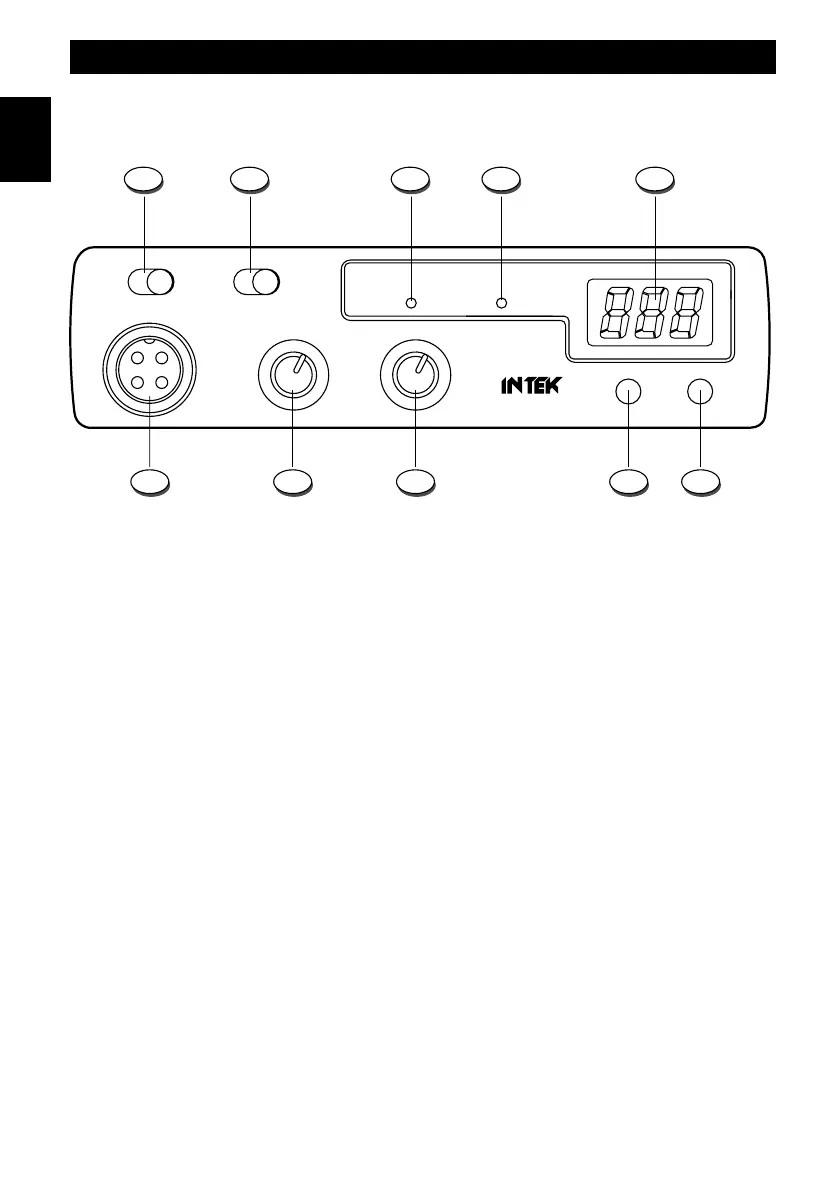
1. AM / FM Selector
This switch allows to select the operating mode AM or FM, in both TX and RX, if the desired operating mode is enabled
by the programmed frequency band.
2. CH9 / CH19 Selector
This 3-position switch allows to select the emergency channels CH9 and CH19 in the programmed frequency band. If
the switch is set to its center position, radio will operate on the normal selected channel.
3. TX Indicator
This red color LED indicator is lighted when radio is in the transmit mode.
4. RX Indicator
This green color LED indicator is lighted when radio is in the receive mode.
5. LED Display
The large size 3-digit LED display indicates the operating channel and the programmed frequency band code.
6. DN (Down) Key
This key allows to select the operating channel downward. By keeping this key pressed, the quick channel selection
mode will be enabled.
7. UP (Up) Key
This key allows to select the operating channel upward. By keeping this key pressed, the quick channel selection mode
will be enabled.
1
9 8 7 610
2 3 4 5
TX
CH
RX
M-120 PLUS
VOLUME
MULTISTANDARD CB RADIO
OFF AS
UP DN
SQUELCH
AM FM CH9 CH19
English


 To Next Page