11
2-6 Connectors and Headers
2-6-1 I/O Back Panel Connectors
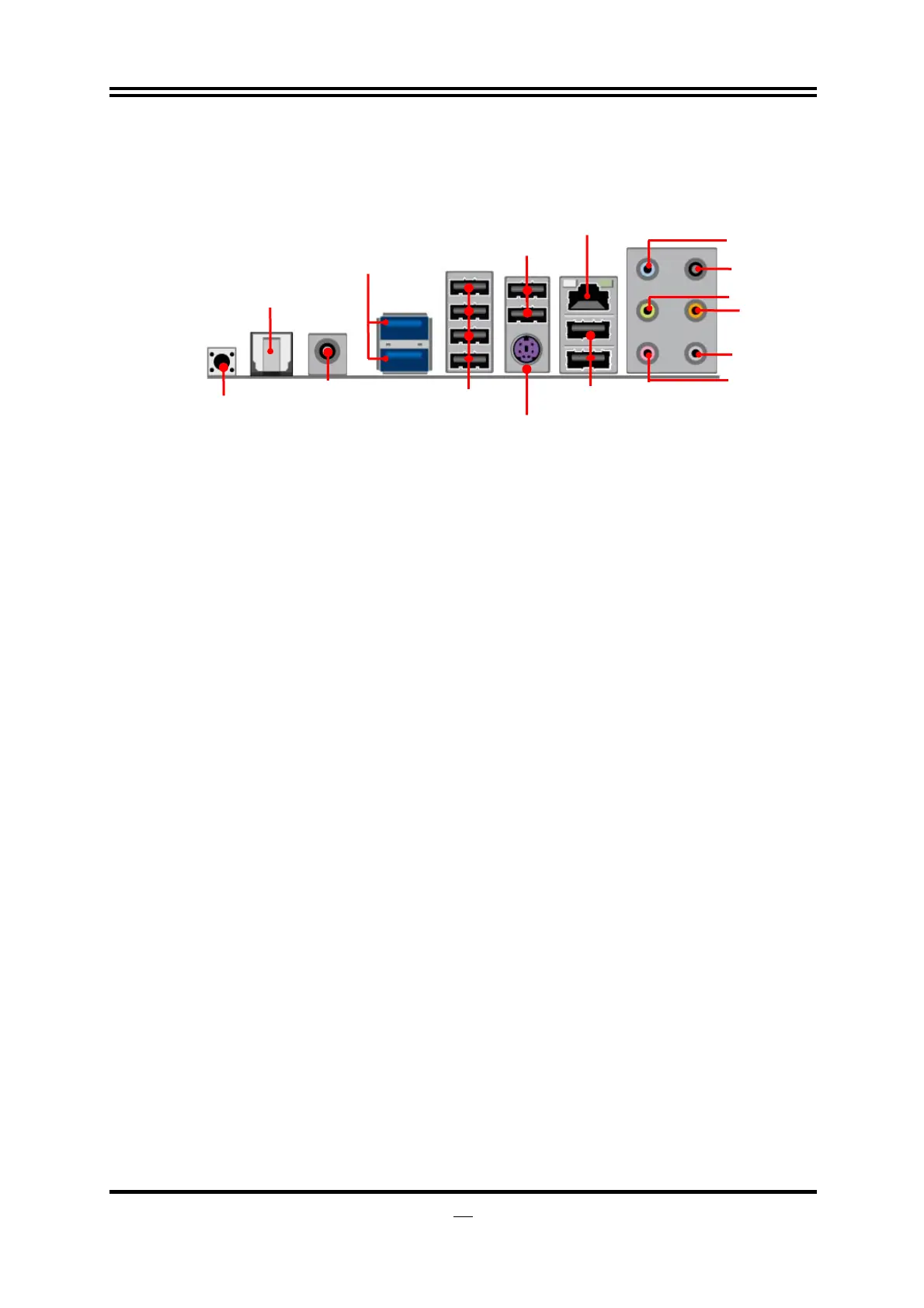
(1) Coaxial SPDIF Out connectors: SPDIF_OUT1
This coaxial S/PDIF connector is provided to transmit digital audio signals to
speaker by connecting a coaxial S/PDIF cable.
(2) Optical SPDIF Out connectors: SPDIF_OUT2
This optical S/PDIF connector is provided to transmit digital audio signals to
speaker by connecting an optical S/PDIF cable.
(3) USB 3.0 Port s: USB 3.0_2.0
These blue connectors are 4-pin USB 3.0 connectors to connect USB devices to
the system board.
(4) USB 2.0 Port s: from USB3/USB20_KB_MS/USB20_LAN
The connectors are 4-pin USB 2.0 connectors to connect USB devices to the
system board.
(5) PS/2 Keyboard /Mouse Connectors: from USB20_KB_MS
The connector is provided to connect PS/2 keyboard input devices.
(6) LAN Port connector: RJ-45 LAN port from USB20_LAN
This connector is standard RJ-45 LAN jack for Network connection. The
connector supports 10MB/100MB/1G B/s data transfer rate .
(7) Audio Line-In, Lin-Out, MIC, RS-Out, CS-Out
,
SS-Out connector: AUDIO
These Connectors are 6 Phone-Jack for LINE-OUT, LINE-IN, MIC, RS-Out,
CS-Out
,
SS-Out audio connections.
Line-in: (BLUE) Audio input to sound chip
Line-out: (GREEN) Audio output to speaker
MIC: (PINK) Microphone Connector
RS-OUT: (BLACK) Rear-Surround audio output
CS-OUT: (ORANGE) Center/ Subwoofer audio output
SS-OUT: (GRAY) Side-Surround audio output
Line-OUT
RJ-45 LAN Port
Line-IN
MIC-IN
RS-OUT
CS-OUT
SS-OUT
USB 2.0 Ports
USB 3.0 Port
PS/2 Keyboard Port
Optical
S/PDIF_OUT
Coaxial
S/PDIF_OUT
USB 2.0 Ports
USB 2.0 Ports
CMOS Clear
Button



 To Next Page