24
Pause ( )
You can insert a pause of 3,6 sec when storing or dialing a number.
Mute
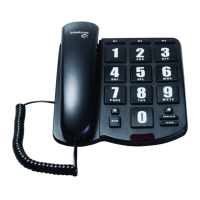
During a call, maintaining the MUTE key pressed will stop the voice trans-
mission and the other side cannot hear you. To do so:
1. Hold down the MUTE key (item 2);
2. To continue with the conversation, release the MUTE key.
Flash
This function is used to access the services offered by your network (on-hold
call ) or for use with a PABX system.
Ringer volume
To adjust the ringer volume, change the switch (item 3) in Lo (low) or Hi (high)
position in accordance with the desired volume.
Phone volume
To adjust the volume of the phone, change the switch (item 1) in L (low) or H
(high) position in accordance with the desired volume.


 To Next Page