3
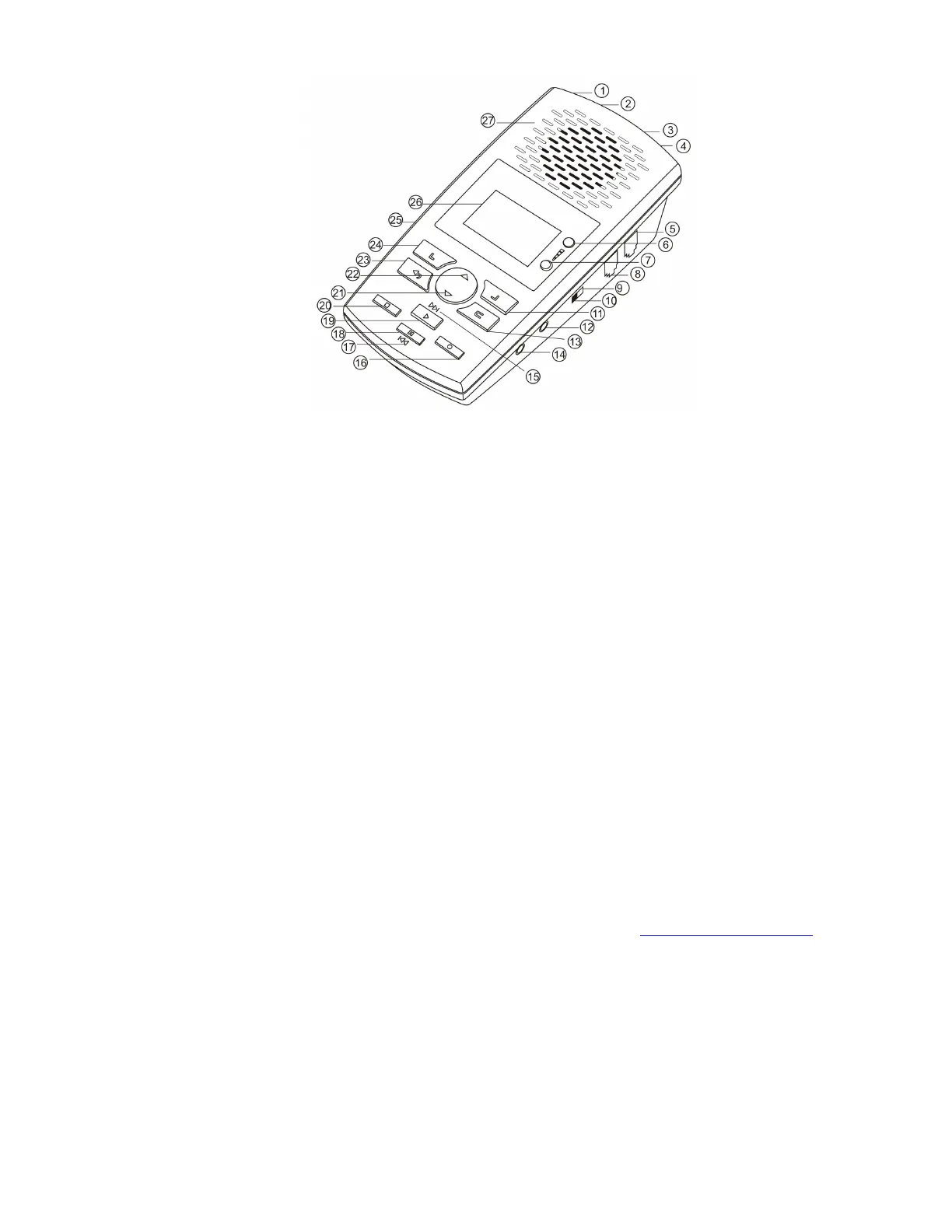
Product Overview
1- USB Port
2 - DV 5V
3 - Line Port
4 - Phone Port
5 - Handset Line
6 - Volume +
7 - Volume -
8 - Handset
9 – Source - Phone
10 – Source - Microphone
11 – Soft Key 2
12 - Microphone
13 - Delete
14 - Earphone
15 -Fast Forward
16 -Recording
17 - Fast Reverse
18 - Pause
19 - Play
20 - Stop
21 - Page Down
22 - Page Up
23 - Back
24 – Soft Key 1
25 - SD Card
26 - LCD Display
27 - Speaker
CHECK THE PACKAGE CONTENTS
- 1 x Call Assistant SD Recorder unit
- 1 x Power supply unit
- 3 x AA batteries
- 1 x Line cord plus 1 x handset cord
- 1 x PC software CD and quick reference install guide (this document)
- 1 x SD Card.
- 1 x USB Cable
Check the contents of your package and inform us immediately if any items are missing at support@irl-recording.com
Quick Setup Instructions
1. Remove the Call Assistant SD, Power supply, line leads & batteries from the packaging.
2. Insert the SD Card provided into the recorder
3. Insert batteries into the battery compartment on the under side of recorder
4. Insert power connector into rear of unit and plug into wall socket


 To Next Page