Need help?
Do you have a question about the Intellijel Metropolix and is the answer not in the manual?
Ensure the 10-pin connector on the power cable is connected correctly to the module before proceeding.
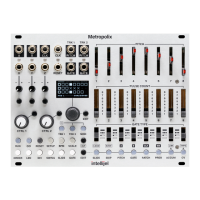
Press one of the three TRACK BUTTONS (TRK 1, TRK 2 or MOD) to designate the editing target.
This button toggles between starting and stopping the sequencer.
This button manually resets the sequencer.
Press the LOOPY button to activate Metropolix’s Loopy mode.
Opens the SETUP MENU, which contains numerous settings that apply across all tracks.
Opens the global tempo (BPM) screen, which displays the current tempo.
Opens Metropolix’s SCALE screen, which defines the scale (and root) used by Metropolix’s pitch-related tracks.
Opens the ORDER screen, which controls the order that stages play back.
Opens the LENGTH screen, which controls the sequence length.
Opens the DIV screen that, for the selected track, divides the global clock and the Pulse gates.
Opens the SWING screen, which sets the swing amount between successive clock pulses.
Opens the SLIDE TIME screen, which determines how the pitch of one stage slides.
Opens the TRACK GATE screen, which sets the selected track’s default gate length.
Accesses the per-stage SLIDE feature. SLIDE can be turned on or off for each stage.
Accesses the per-stage SKIP feature. SKIP can be turned on or off for each stage.
Accesses the per-stage PITCH override feature.
Accesses the per-stage GATE override feature.
Accesses the per-stage RATCHET feature.
Accesses the per-stage PROBABILITY feature.
Accesses the per-stage transpose ACCUMULATOR feature.
Accesses the per-stage CV Lane.
The first two Stage buttons in ALT Mode are used to manage Metropolix presets.
The second Stage button in ALT Mode is used to save presets.
The third and fourth Stage buttons in ALT Mode are used to assign a function to Metropolix’s OUT A and OUT B jacks.
The fifth Stage button in ALT Mode is used to configure Metropolix’s CLK OUT jack.
The sixth Stage button in ALT Mode is used to route signals to outputs on an optional expander module.
Assigns the selected track’s cumulative transposition limits.
Sets whether the TRK 1 or TRK 2 CV Lane acts as a gate CV or continuous voltage.
Press the MOD button, then the EDIT button and corresponding STAGE button.
Configure which parameter and track(s) you want the knob to control.
Describes each assignable CTRL knob destination.
Configure which parameter and track(s) you wish to control with the AUX input.
Lists available destinations for AUX inputs and internal MOD lane routings.
Copy and paste per-stage settings from one stage to another.
Copy and paste track settings (e.g., ORDER, LEN) between tracks.
Copy and paste track menu settings between tracks.
Copy and paste MOD Lane settings between lanes.
Instructions to enter the calibration mode for outputs and inputs.
Procedure to calibrate the variable outputs (TRK 1/2 PITCH, OUT A/B).
Procedure to calibrate the variable inputs (X, Y, Z).
 General
| Brand | Intellijel |
|---|---|
| Model | Metropolix |
| Category | Recording Equipment |
| Language | English |

 To Next Page