Need help?
Do you have a question about the Intellijel Scales and is the answer not in the manual?
Instructions for physically installing the Intellijel Scales module into a Eurorack case and connecting power.
Instructions on how to activate and configure the Scales module for sequencer mode.
Guide to recording, replacing, overwriting, and clearing sequence steps.
How to play back recorded sequences and transpose them using ROOT Mode.
Steps to save a recorded sequence to the module's storage.
Steps to load a previously saved sequence from the module's storage.
Steps to access the calibration sub-menu within CONFIG mode.
Details on selecting calibration targets (OUT A, B, PITCH, SHIFT) and adjusting values.
Procedures for calibrating OUT A, OUT B, PITCH input, and SHIFT input.
 General
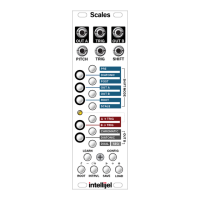
| Type | Quantizer |
|---|---|
| Channels | 1 |
| Module Width | 8HP |
| Input | CV input |
| Output | CV output |
| Power | +12V / -12V |

 To Next Page