- 82 -
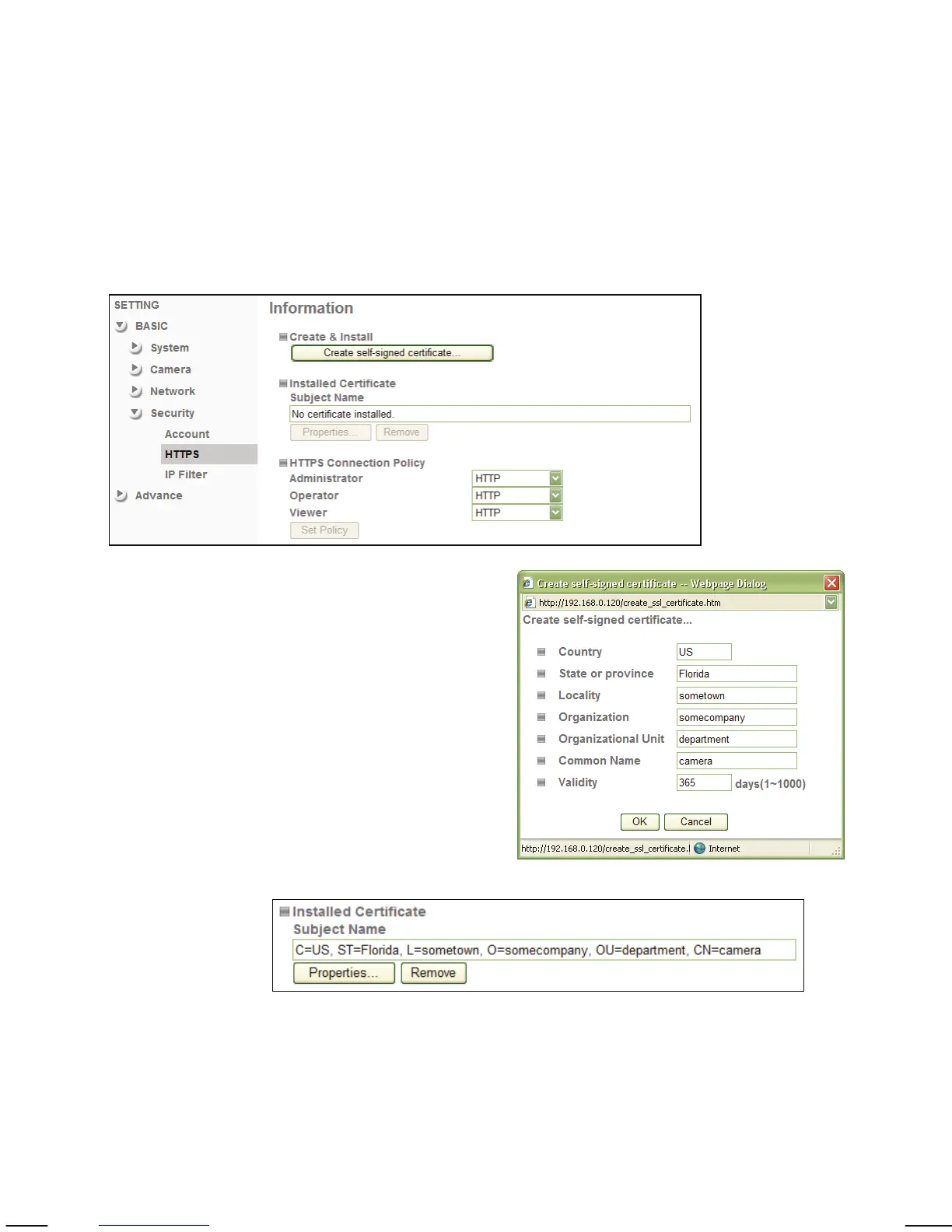
Camera -> Security -> HTTPS:
Secure Sockets Layer (SSL) is a cryptographic protocol that provides security
for communications over networks such as the Internet.
HTTPS is a URI scheme used to indicate a secure HTTP connection (SSL
encrypted). It is syntactically similar to the http:// scheme that is normally
used for accessing resources using HTTP. The differences are that SSL-
encrypted connections always begin with https:// instead of http://. HTTPS
connections use TCP port 443 by default, compared to standard HTTP
connections, which use port 80.
Create & Install: Click this button to
create a self-signed
certificate. A window
will open in which you
can enter the
information for your
certificate.
Click OK to install the
certificate.
Installed Certificate:
Once the certificate is installed, you can see the details here.
To view the certificate details click on Properties. Click on
Remove to delete it.
HTTPS Connection Policy:
Define for the individual viewer modes, if HTTPS can be used
in order to connect to the camera.



 To Next Page