EN - Page 5 of 6
b) TWS / Smartphone
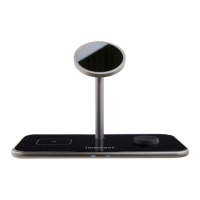
The TWS area (le) of the device can be used to charge all devices that support the Qi standard. These can
be, for example, headphones, smartwatches or smartphones. To nd out whether your device supports wi-
reless charging via Qi, please refer to the corresponding operang instrucons or contact the manufacturer.
Place your device so that the Qi area of the device is centred on the cross of the charging area. The charging
process starts automacally, and the le LED lights up blue.
c) Watch
The connector for your Apple Watch is located on the right side. Apple Watches as of series 3 are supported.
Simply guide the boom of your watch over the connector and the built-in magnets will help with the cor-
rect alignment. The charging process starts automacally and the right LED lights up blue.
If the charging process does not start, please check,
a. whether your iPhone supports the MagSafe standard for the magnec stand, whether your smart-
watch for the watch area (right) is an Apple Watch series 3 or newer and whether your headphones,
smartphone or other device for the TWS area (le) support the Qi standard.
b. whether there is a foreign object between the devices or you are using an unsuitable case.
c. whether you have chosen the enclosed quick-charge power supply or a dierent but compable
one. If this is not the case, replace it accordingly.
d. whether you have rst established the power supply and only then started the charging process. If
not, please disconnect both devices from each other and unplug the power supply for a few seconds.
Then plug the power supply unit back into the socket and only then start the charging process.
e. whether the cable ends and the power supply unit are correctly connected.
Please note that the ambient temperature and the charging electronics of the device to be charged have
an eect on the charging behaviour over which the inducve charging staon itself has no inuence. For
example, the charging speed can be reduced at increased temperatures or already reached charging levels,
the charging process – especially with the watch – can be briey interrupted or briey fail to make any
charging progress.
Step 3: End charging process
To end the charging process, simply remove your device from the inducve charging staon.
SERVICE/DISTRIBUTOR
INTENSO INTERNATIONAL GMBH I Kopernikusstraße 12-14 I D-49377 Vechta
Email (technical support): support@intenso-internaonal.de
Email (RMA number): rma@intenso-internaonal.de
Internet: www.intenso.eu
Telephone (technical support): +49 (0) 4441 – 999 111
(Mon. – Thur. 09:00 – 16:30; Fri. 09:00 – 14:00)


 To Next Page
 Loading...