9
IP-1015WS(NETWORK WALL SPEAKER)
9
3. Factory reset switch
This switch initializes the device settings.
When pressed for more than 20 seconds, the STATUS LED
blinks quickly.
Do not remove the power until normal operation (blinks 0.5
seconds).
4. Ethernet port (RJ-45, PoE)
Connect a PoE (Power over Ethernet) switch
Default IP address: 192.168.1.99 (Static)
The recommended Lan cable is 0.15/m cable within 100m
when PoE is used and 0.1/m cable within 100m when
PoE+ is used. The total DC resistance of the Lan cable is
15 or less when PoE is used and 10 or less when PoE+
is used.
5. Micro SD card slot
Insert a Micro SD card to this slot
6. Ground terminal
This is the terminal used to ground the equipment.
It is highly recommended to make the ground connection as
short as possible.
7. Line Output terminal (3p Euro Block)
Balanced audio output
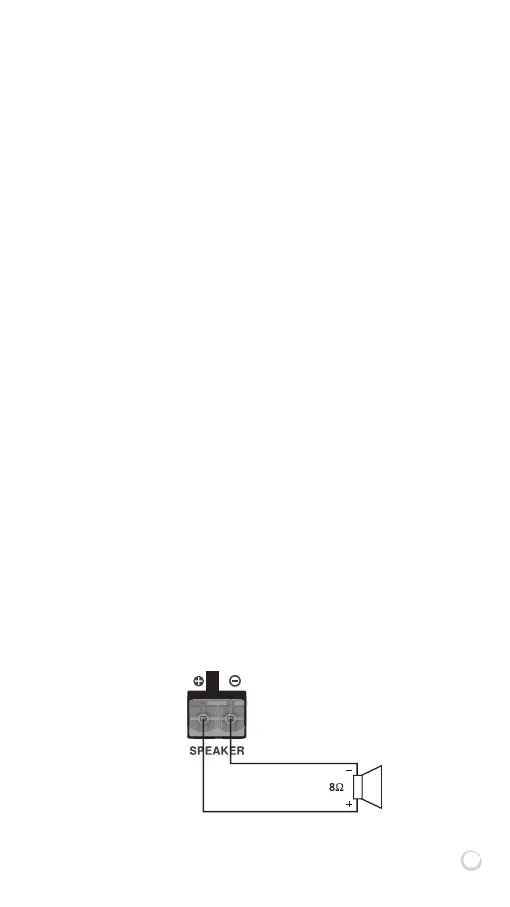
8. SPEAKER (8Ω) terminal
Connect a speaker to this terminal. Refer to the diagram below
for the connection.
The rated speaker impedance is 8. The speaker which has
less than 8 impedance may cause malfunction or damage.


 To Next Page