12
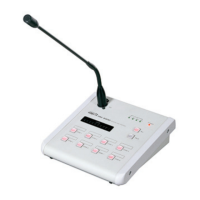
RM-8000(REMOTE MIC STATION)
2) SWITCH2 ON : Chime increased by 4 tones for
starting broadcast is emitted
when pressing the TALK button.
3) SWITCH3 ON : Chime decreased by 4 tones for
ending broadcast is emitted
when releasing the TALK button.
4) SWITCH1, 2 ON : Same as for SWITCH1 ON.
- The button turns on if pressing the relevant button of
the area to broadcast. All zones of the PX-8000,
where the relevant RM-8000 is connected, are
selected if pressing the ALL button.
- MIC broadcasting is done with the TALK button
pressed. In this case, perform broadcasting after
checking start of Chime broadcasting using a built-in
monitor speaker.
- Adjust MIC output volume of RM-8000 and input
volume of PX-8000 while listening to broadcasting
volume or checking the level meter.
- “R” is displayed on the BGM display window of PX-
8000 and LM-8000 of the broadcasting area.
- Release the TALK button pressed to end
broadcasting. TALK button is on PTT method.
- Check ending of Chime broadcasting using a built-in
monitor speaker.
■■
■
RM-8000 PRIORITY BROADCASTING
- Broadcasting of any RM-8000 is allowed in the non-
broadcasting area.
- Zone being broadcasting has priority with the
order of RM1 > RM2 > RM3 > RM4.
- If the relevant area button turns off when pressing
the broadcasting area button and then pressing


 To Next Page