EasyManua.ls Logo

Intermatic IOS-CMP-DT-LV - User Manual

Intermatic IOS-CMP-DT-LV
6 pages
Print Icon
To Next Page IconTo Next Page
Loading...
360˚ Dual Technology
PIR/Ultrasonic
Low Voltage Occupancy Sensor
With Light Level Feature
MODEL: IOS-CMP-DT-LV
RATINGS:
Voltage: 24 VDC
Current Consumption: 20 mA
Power Supply: IOS-PP24 Power Pack
Adjustable Ambient Light Level: 10 fc to Daylight
Selectable Time Delay: 5 sec to 30 min (DIP switch)
Test Mode: 5 sec upon initial power-up
PIR Sensitivity Adjustment: 50% or 100% (DIP switch)
Ultrasonic Sensitivity Adjustment: 30% to 100%
Coverage - PIR: up to 1600 ft
2
(150
m2
)
Ultrasonic: up to 1000 ft
2
(93
m2
)
Temperature Range: 32° F to 122 °F (0° C to 50° C)
INSTALLATION AND CONFIGURATION INSTRUCTIONS
Figure 2
DESCRIPTION:
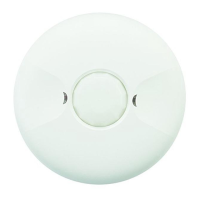
The IOS-CMP-DT-LV 360° Dual Technology Low Voltage Occupancy Sensors control the load based on
occupancy and ambient light levels. It combines passive infrared (PIR) and ultrasonic technologies to
help avoid false triggering while increasing presence detection. Selectable modes allow the sensor to
turn load ON and hold it ON as long as either or both technologies detect occupancy. If no movement is
detected for a user-specified time of 5 seconds to 30 minutes, the load is turned OFF. The occupancy
sensor provides a 360° coverage pattern, up to 1600 ft
2
(150
m2
) for PIR and 1000 ft
2
(93
m2
) for Ultrasonic
sensor.
MOUNTING THE SENSOR
NOTE: A junction box and screwdriver are needed to complete this procedure.
See Figure 4 for reference.
1. Make sure power is turned off at the main disconnect.
2. Look for small opening on periphery of cover. With the help of a flathead screwdriver, snap off front
cover. Next, remove mounting adaptor by opening tabs A & B as shown in Figure 4.
3. Attach mounting adaptor to junction box.
4. Observe these guidelines when mounting the sensor:
The occupancy coverage area may be more or less than the sensing distances shown in Figure 1
due to potential coverage area obstacles, such as furniture or partitions.
Place the sensor at least 4 to 6 feet (1,2 to 1,8m) away from air supply ducts to prevent false
activations.
If you mount the sensor outside of 8 to 10 feet (2,4 to 3m) from the floor, it affects the coverage
pattern. Decreasing the mounting height decreases the sensor range and increases the sensitivity
to smaller motions. Mounting the sensor at heights more than 12 to 14 feet (3,7 to 4,3m) reduces
sensitivity.
For coverage of large areas with multiple sensors, an overlap of 10 to 20% is recommended as
shown in Figure 2.
Avoid placing the sensor directly in line with an open door through which it has a clear view out.
This may cause the sensor to detect people walking by the door.
5. Punch knockout on the junction box and insert the IOS-PP24 power pack nipple into the knockout.
6. Pull the low voltage wires from the power pack into the junction box, through the conduit knockout.
7. Connect the low voltage wires from the power pack to the appropriate wire on the occupancy
sensor. See table below for wire designations. Refer to Figure 3.
Wire from power pack To Terminal on Occupancy Sensor
Red wire (+24 VDC) +24 VDC terminal
Black wire (Common) Common terminal
Blue wire Control Out terminal
8. To connect multiple sensors (up to 6) to power pack, run the blue control out wire from the sensor
to the blue wire of the power pack.
9. Align and snap sensor onto mounting adaptor.
10. After setting adjustment, snap cover back onto sensor.
Figure 3
WARNING
Risk of Fire or Electric Shock
Disconnect power at the circuit breaker(s) or fuses before installing or servicing.
Installation and/or wiring must be in accordance with national and local electrical code
requirements.
Use COPPER conductors ONLY.
Indoor dry location use only.
Do not exceed electrical ratings.
Figure 1
Figure 4
20%
Ultrasonic
Overlap
PIR
Coverage
44 ft.
(13.4m)
Ultrasonic
Coverage
30 ft.
(9.14m)
8 ft
(2.44m)
Typical
desk-top
level

Questions and Answers

  • R
    Raymond HillJul 28, 2025
    What to do if Intermatic Security Sensors load does not turn on with occupancy?
    • T
      Thomas PooleJul 28, 2025
      If the load does not turn on when the Intermatic Security Sensors detect occupancy, there are several things you can check: * Ensure the circuit breaker has been turned back on. * Verify all sensor and power pack wire connections are secure. * Check for 24 VDC input to the sensor between the red and black low voltage wires. If 24 VDC is present, replace the sensor. * If 24 VDC is not present, check the high voltage connections to the power pack. If the high voltage connections are good and high voltage is present, replace the power pack.
  • D
    David OdomAug 9, 2025
    What causes unwanted sensor activations on Intermatic IOS-CMP-DT-LV?
    • M
      Melinda BerryAug 9, 2025
      Unwanted sensor activations, indicated by the LED flashing on Intermatic Security Sensors, can occur due to a few reasons: * The sensor might be located too close to HVAC or VAV vents with heavy airflow. In this case, relocate the sensor. * You may need to reduce the ultrasonic sensitivity. * Consider masking the lens to reduce PIR coverage.
  • J
    Jasmine MooreAug 15, 2025
    What to do if the green LED does not flash on Intermatic IOS-CMP-DT-LV?
    • B
      Bruce EdwardsAug 15, 2025
      If the green LED on your Intermatic Security Sensors does not flash, the ultrasonic sensitivity setting may need to be increased. Turn it clockwise as needed.
  • T
    Thomas SmithAug 20, 2025
    Why red LED does not flash on Intermatic IOS-CMP-DT-LV?
    • A
      anthonywilliamsAug 21, 2025
      If the red LED on your Intermatic Security Sensors does not flash, it could be due to the following reasons: * When power is initially applied to the sensor, there is a warm-up period. * Ensure that the PIR sensitivity is set to 100% (DIP Switch 1).
  • O
    Olivia CollierNov 2, 2025
    What to do if Intermatic IOS-CMP-DT-LV load does not turn off?
    • G
      Gwendolyn TuckerNov 2, 2025
      If the load for your Intermatic Security Sensors doesn't turn off, follow these steps: 1. Check all sensor and power pack wire connections. 2. Disconnect the power pack blue wire. 3. If the load still doesn't turn off, examine the power pack wiring and replace the power pack if needed. 4. If the load turns off after disconnecting the blue wire, the issue might be with the sensor or the wiring between the sensor and power pack. 5. Reconnect the blue wire. 6. Minimize the sensitivity and time delay, then allow the sensor to time out. 7. If the load turns off, the sensor is functioning correctly, so adjust the sensitivity and time delay accordingly. 8. If the load still doesn't turn off, inspect the wiring between the sensor and power pack. 9. If the wiring is correct, replace the s...

Summary

INSTALLATION AND CONFIGURATION INSTRUCTIONS

RATINGS

Technical specifications including voltage, current, power, sensitivity, and coverage.

DESCRIPTION

Overview of the dual technology sensor and its functionality for occupancy detection.

MOUNTING THE SENSOR

Step-by-step guide for physically installing the occupancy sensor.

WARNING Risk of Fire or Electric Shock

SENSOR ADJUSTMENT

ADJUST THE AMBIENT LIGHT LEVEL

How to set the ambient light threshold for load activation.

ULTRASONIC SENSOR SENSITIVITY

Adjusting the sensitivity of the ultrasonic motion detection.

PIR SENSOR SENSITIVITY

Adjusting the sensitivity of the passive infrared motion detection.

TRIGGER MODE

Selecting how the sensor detects motion (PIR, Ultrasonic, or Both).

TIME DELAY

Setting the duration the load remains on after no occupancy is detected.

OVERRIDE

Functionality to maintain the sensor ON regardless of occupancy.

TROUBLESHOOTING

Load does not turn on with occupancy

Steps to diagnose why the load is not activating when occupancy is detected.

Load does not turn off automatically

Steps to diagnose why the load fails to turn off after the time delay.

Unwanted Sensor Activations (LED flashes)

Identifying and resolving causes of false sensor triggering.

LIMITED WARRANTY

Intermatic IOS-CMP-DT-LV Specifications

General IconGeneral
BrandIntermatic
ModelIOS-CMP-DT-LV
CategorySecurity Sensors
LanguageEnglish

Related product manuals