EasyManua.ls Logo

Intermatic SS8 Series - User Manual

Intermatic SS8 Series
4 pages
Print Icon
To Next Page IconTo Next Page
Loading...
Installation Instructions - Single Switch or 3-way - to replace an existing
switch:
1. TURN OFF POWER by REMOVING FUSE or turning
the CIRCUIT BREAKER OFF.
2. Remove the existing wall switch.
Prepare the ends of the building wiring as shown.
7/16”
Trim building wires bare to 7/16”.
BLACK WIRE
BLUE WIRE
RED WIRE
(Capped, Not Connected)
WIRE FROM
“COMMON” OF
OLD SWITCH
BLACK WIRE
RED WIRE
BLUE WIRE
REMOTE
3-WAY
SWITCH
MOVE
JUMPER WIRE
TO OTHER
TERMINAL
IF THIS
SWITCH
DOES NOT
TURN LIGHT
ON
COMMON
Single switch:
3. Connect one of the building wires to the black wire
from the timer, using the wire nuts provided.
Connect the other building wire to the blue wire from
the timer.
THE RED TIMER WIRE IS NOT USED FOR SIN-
GLE SWITCH INSTALLATIONS. Cap the red wire
with a wire nut.
BE SURE THAT ALL THE WIRE NUTS ARE SECURE.
3-way switch: (See “Other Installations” to use a dimmer or if switching from 3 or more
locations)
3a. A three way switch has three wires connected to it. One of the wires is “common” (the terminal
has a different colored screw or there are markings on the old switch). Connect the Black wire from
the timer to the common wire. Connect the other two wires to the Blue and Red wires from the timer (it
doesn’t matter which goes to which.)
3b. Identify the “common” terminal at the other (remote 3-way) switch. Connect the supplied jumper
wire from the common terminal to one of the other two terminals of the switch.
(If the light does not turn on when you get to step 6, turn power off at the fuse or circuit breaker and
switch the jumper wire to the other terminal.)
4. Tuck the wires into the wall box leaving room for the timer.
5. Using the screws provided, mount the timer to the wall box then install the wall plate.
6. Return the power to the circuit at the service panel. Install battery if not already installed. Press reset
button.
After display starts flashing "12:00 AM", press the "NEXT/ON/OFF" button. The display should switch
between ON and OFF. Your timer is now ready to set.
Battery Replacement
The 1.5 VOLT alkaline battery should operate your timer for 3 years or more under typical conditions.
High or low temperature or frequent use of the manual pushbutton or the 3-way switch will reduce the
battery life. Replace the battery when the digital display is dim, the message ‘lobAt’ (Meaning LOW
BATTERY) is displayed, or if the timer fails to operate. Press any button to clear the ‘lobAt’ message.
The timer has built-in memory protection providing at least 15 seconds to change a weak battery with-
out losing your time-of-day setting. You do not need to turn off the load or the power in order to replace
the battery, however, do not attempt to switch the timer on or off while the battery is out or your time
setting will be lost and the timer will need to be reset.
Controls and Displays
Cover/Switch
The clear cover/switch is the manual ON/OFF control.
1. Pull at notch at top edge to remove cover so you
can use the programming buttons.
To replace cover/switch:
2. Set bottom in first.
3. Click in the top.
To remove battery:
4. Release battery holder with flat
screwdriver at notch (4a) and
pull straight out.
To re-install battery:
5. Place AA Alkaline battery in
holder with “+” end towards
front of timer. Insert battery
and holder into timer. Push at
(5) so it clicks into place.
Battery Holder
AM
DAY
H+
M+
MODE
RESET
ON/OFF
EVENT
MO
ON
MAN
AM
DAY
H+
M+
MODE
RESET
ON/OFF
EVENT
MO
ON
MAN
2
3
4a
5
1
Introduction
The timer can replace your regular or 3-way light switch (where two switches control the
same light) to control lights for security, or can control an outlet to switch most 120VAC
loads up to the maximum rating on the timer label. The timer can control incandescent
lights, fluorescent lights, flood lights (PAR lamps), stereos, or appliances such as an air
conditioner. The timer can also control many loads 12 to 277 VAC and 12 to 28 Volts DC.
Timer may not be used with lighted 3-way switches. You will need to use a Decorator style
wall plate with this timer (not supplied).
The installation instructions on this page are for replacing a light switch (or 3-way light
switch) with the timer. See “Other Installations” on the next page for wiring diagrams for new
construction, switching from 3 or more locations, or using the timer with a dimmer.
MODEL SS8 SERIES
INSTALLATION AND OPERATING
INSTRUCTIONS
Features
Automatic or manual operation. Push the clear cover/switch to switch On or Off at any time.
• Program up to 7 On/Off setting pairs (14 automatic switch settings).
Astronomic Feature automatically adjusts for changing seasons.
Automatic Daylight Savings Time adjustment.
• Each setting time can be once a week, every day, every weekday, or only on weekends.
• LCD digital clock and readout.
• Random feature automatically varies switching times for a “lived-in” look.
One AA alkaline battery keeps time and operates timer for up to 3 years, even without utility power.
• Built in memory holds settings indefinitely without battery.
• Can be used for flood (PAR) and compact fluorescent lamps and dimmers.
• Unique “hard contact” output switch allows timer to control most 120 VAC loads.
Also controls many loads 12 to 277 VAC and 12 to 28 Volts DC.
Refer to product label for maximum ratings for various voltages and load types.
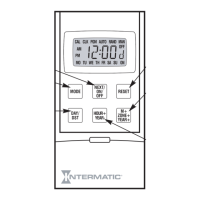
MODE
Switch from one
program mode
to another.
NEXT/ON/OFF
Switches between
ON and OFF settings
when programming
the timer. Confirms
program entry and
advances timer to
next selection.
RESET
Press RESET while holding
down NEXT/ON/OFF
button to clear all previous
programming.
M+ ZONE+ YEAR+
Advances months in the
calendar mode.
Advances minutes in the
clock and program modes.
Advances years in the
calendar mode.
HOUR+ YEAR-
Subtracts years in the
calendar mode.
Advances hours in the
clock and program modes.
DAY/DST
Changes days when
setting calendar or
programming ON and
OFF times.
Press to select
automatic or manual
daylight savings time.
CALENDAR
MODE
CLOCK
MODE
PROGRAM
MODE
AUTOMATIC
MODE
RANDOM
MODE
MANUAL
MODE
OFF
SETTING
PROGRAM #
AUTO
DAYLIGHT SAVINGS
ON
SETTING
AM or PM
INDICATOR
DAYS OF THE WEEK
http://waterheatertimer.org/Intermatic-timers-and-manuals.html#SS8
_________________________________________________________________________

Questions and Answers

  • K
    Kyle JeffersonAug 18, 2025
    Why is my Intermatic SS8 Control Unit timer display dim or not working?
    • M
      Maria LeeAug 18, 2025
      If your Intermatic Control Unit timer does not operate, the display is dim, blank, unreadable, shows nonsense or ‘lobAt’, or operates erratically, it's likely due to a worn-out, missing, or incorrectly installed battery. It can also occur if the timer was operated without a battery or the battery was out too long during replacement. To resolve this, install a fresh AA size alkaline battery in the correct direction. Then, press the RESET button and reprogram the time-of-day.
  • W
    woodlatoyaAug 20, 2025
    How to fix Intermatic SS8 timer switching at wrong times?
    • K
      kimbradleyAug 20, 2025
      If your Intermatic Control Unit timer switches at incorrect times or skips some switching times, it could be due to incorrect programmed schedules or the timer being in AUTO RAND(om) mode, which varies switching times by up to +/- 15 minutes. To fix this, review and revise ALL 7 ON/OFF switching time pairs by repeatedly pushing the NEXT/ON/OFF button while in PGM mode. Also, ensure you use the MODE pushbutton to select AUTO mode.
  • T
    tiffany71Aug 23, 2025
    What to do if Intermatic SS8 timer display is normal but doesn't switch?
    • S
      Sandra HuberAug 23, 2025
      If your Intermatic Control Unit timer doesn't switch but the display is normal, the timer is likely not in AUTO, AUTO RAND(om), or MAN(ual) mode. To resolve this, use the MODE pushbutton to select the desired operating mode.
  • M
    Melissa DavisAug 26, 2025
    Why Intermatic Control Unit timer works manually but not on schedule?
    • R
      Robin MartinezAug 26, 2025
      If your Intermatic Control Unit timer works manually but does not follow the scheduled program, it's likely because the timer is not in AUTO or AUTO RAND(om) mode. To correct this, use the MODE pushbutton to select either AUTO or AUTO RAND mode.
  • B
    Brandi CisnerosAug 28, 2025
    Why Intermatic Control Unit load state doesn't match programmed state?
    • J
      James ShermanAug 28, 2025
      If the load state doesn’t match the programmed state immediately after programming the time or schedule on your Intermatic Control Unit, it's because the timer does not “catch up” to the programmed load state. The load will remain in its state prior to entering the PGM mode. The timer will begin following the scheduled program at the next contrary ON/OFF time. After entering your schedules or the time, then returning to the AUTO modes, push the next NEXT/ON/OFF button to change the load state if necessary.
  • J
    Jonathan HarrisonAug 31, 2025
    Why Intermatic Control Unit switches at unexpected times?
    • B
      Brandon McknightAug 31, 2025
      When using a combination of Astronomic and Specific switching times, the timer switches at unexpected times or doesn't switch when expected because of conflicting Astronomic and Specific switching time settings. Complete the steps under 'Setting the Calendar' then temporarily change your Intermatic Control Unit timer's calendar setting to June 21st. Now review the SUNUP and SNSET times by pushing the NEXT/ON/OFF button. Make sure your Specific ON or OFF time settings won't interfere with these Astronomic switching times. Be sure to change the date back to today's date when you're done.
  • M
    Michelle WilliamsonSep 2, 2025
    What to do if Intermatic SS8 Control Unit timer operates but the light doesn’t come on?
    • K
      karina38Sep 2, 2025
      If your Intermatic Control Unit timer operates, but the light doesn’t come on in dimmer applications, it could be because the dimmer is turned off or is set too low to turn back on, or the bulb is burned out. Make sure the timer display shows ‘ON’, then check dimmer operation at full brightness setting. If timer control is required at very low brightness settings, use a premium quality dimmer that can be turned on when set low.
  • A
    Austin PowellSep 4, 2025
    What does 'no Op' mean on Intermatic SS8 display?
    • E
      Elizabeth DoyleSep 4, 2025
      If the display shows ‘no Op’ on your Intermatic Control Unit, it indicates that the mechanism is inoperative. If the timer is in a very cold environment, try again when warmer. If not, and if the battery is good, the timer should be replaced. Push in battery cover until you hear a click. Push reset button to clear display and reprogram the time-of-day. Replace device if NoOp will not clear from display.
  • B
    Brandy MullinsSep 7, 2025
    Why Intermatic SS8 Control Unit load only works in one remote switch position?
    • D
      dmurraySep 7, 2025
      If the load only operates when the remote (3-way) switch is in one position, or the Intermatic Control Unit timer ignores the remote switch, the remote switch is likely wired incorrectly. Recheck the wiring, especially for the jumper, per 'Installation Instructions - 3-Way Switch' and 'Other Installations'.
  • R
    Roberto SantosSep 9, 2025
    Why Intermatic SS8 Control Unit timer ignores remote switch?
    • J
      Jessica WilliamsSep 10, 2025
      If your Intermatic Control Unit timer ignores the remote (3-way) switch even though it is wired correctly, this may be due to excessive wire length (greater than 100 feet) or buried wiring to the remote switch, or the remote switch itself may be defective or worn out. To resolve this, eliminate the excessive wire length or buried wiring, replace the buried cable, do without the remote switch, or consult factory for other options. Replace the remote switch.

Summary

Introduction and Features

Product Introduction

Details the SS8 timer's capabilities, including controlling various loads and switch types.

Key Features

Highlights automatic/manual operation, programming options, astronomic/DST adjustments, and battery backup.

Installation and Setup

Single Switch or 3-way Replacement Installation

Step-by-step instructions for replacing existing single or 3-way light switches with the timer.

Battery Replacement Procedure

Guidance on how to replace the internal AA alkaline battery and ensure proper operation.

Controls and Displays Overview

Explanation of the timer's manual cover/switch, programming buttons, and LCD display.

Programming and Operating Instructions

Glossary of Terms

Definitions of key terms like Astronomic, SUNUP, SUNSET, DST, and Program Zone.

Setting the Calendar and Zone

Step-by-step guide to setting the year, date, DST mode, and geographic program zone.

Setting the Time of Day

Instructions for setting the current hour and minute on the timer's clock.

Programming ON and OFF Times

How to set specific or astronomic ON/OFF times for daily, weekly, or weekend operation.

Advanced Settings and Other Installations

Reviewing and Changing Settings

How to view and modify calendar, DST, zone, and programmed ON/OFF times.

Manual Operation Mode

Using the timer as a manual switch while retaining programmed settings.

Wiring Diagrams for Multi-Switch Installations

Instructions for 2, 3, 4+, and dimmer switch installations.

Special Application Guidelines

Notes on using the timer with dimmers, without utility power, or for DC voltage applications.

Troubleshooting and Warranty

Troubleshooting Guide

Common symptoms, possible causes, and remedies for timer malfunctions.

Limited One Year Warranty

Details of the warranty coverage, limitations, and customer service contact information.

Intermatic SS8 Series Specifications

General IconGeneral
BrandIntermatic
ModelSS8 Series
CategoryControl Unit
LanguageEnglish

Related product manuals