A product of GRA, Inc. www.grainc.net
CN70 Barcode Scanner
Knowledge Guide
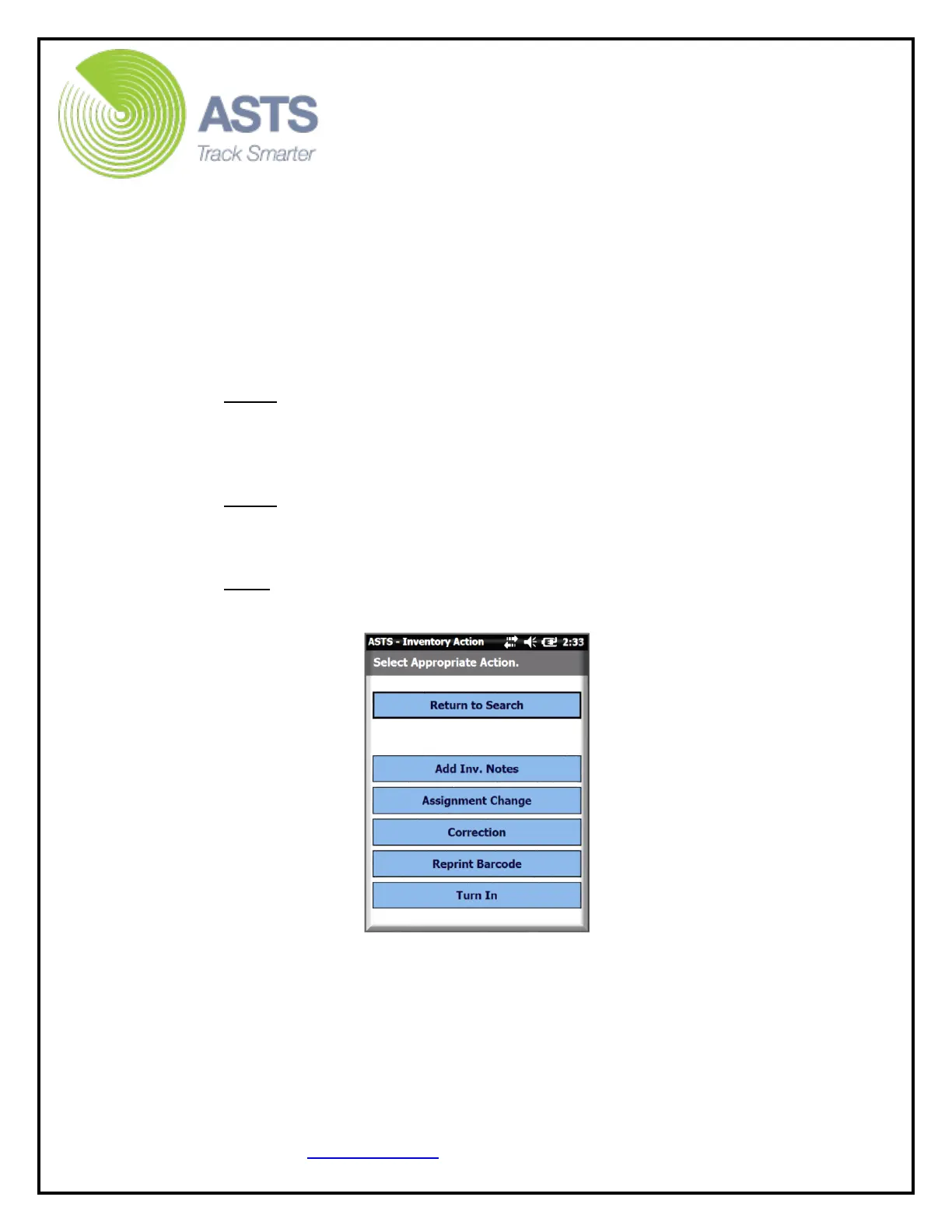
b. Select the “Add Inv. Notes” button to enter an Inventory Note for the
item just scanned.
c. Select the “Assignment Change” button to create a Sub Hand Receipt
Assignment Alert (on the ASTS home page). This facilitates a Sub HR
assignment change after the scanner inventory file has been uploaded.
d. Select the “Correction” button to edit item information. This will
create a Correction Alert on the ASTS home page. This facilitates a
correction transaction after the scanner inventory file has been
uploaded.
Note: Item information allowed to be entered as a correction is:
item’s serial number, model number, nomenclature, manufacturer,
year of manufacturer (YOM), or cost, etc.
e. Select the “Reprint Barcode” button to create a “Barcode Reprint” alert
on the ASTS home page.
Note: This is simply a reminder in case the barcode label is damaged
and needs to be replaced.
f. Select the “Turn In” button to create a “Turn In” alert on the ASTS
home page.
Note: This is simply a reminder in case the item later needs to be
Turned In.


 To Next Page