A product of GRA, Inc. www.grainc.net
CN70 Barcode Scanner
Knowledge Guide
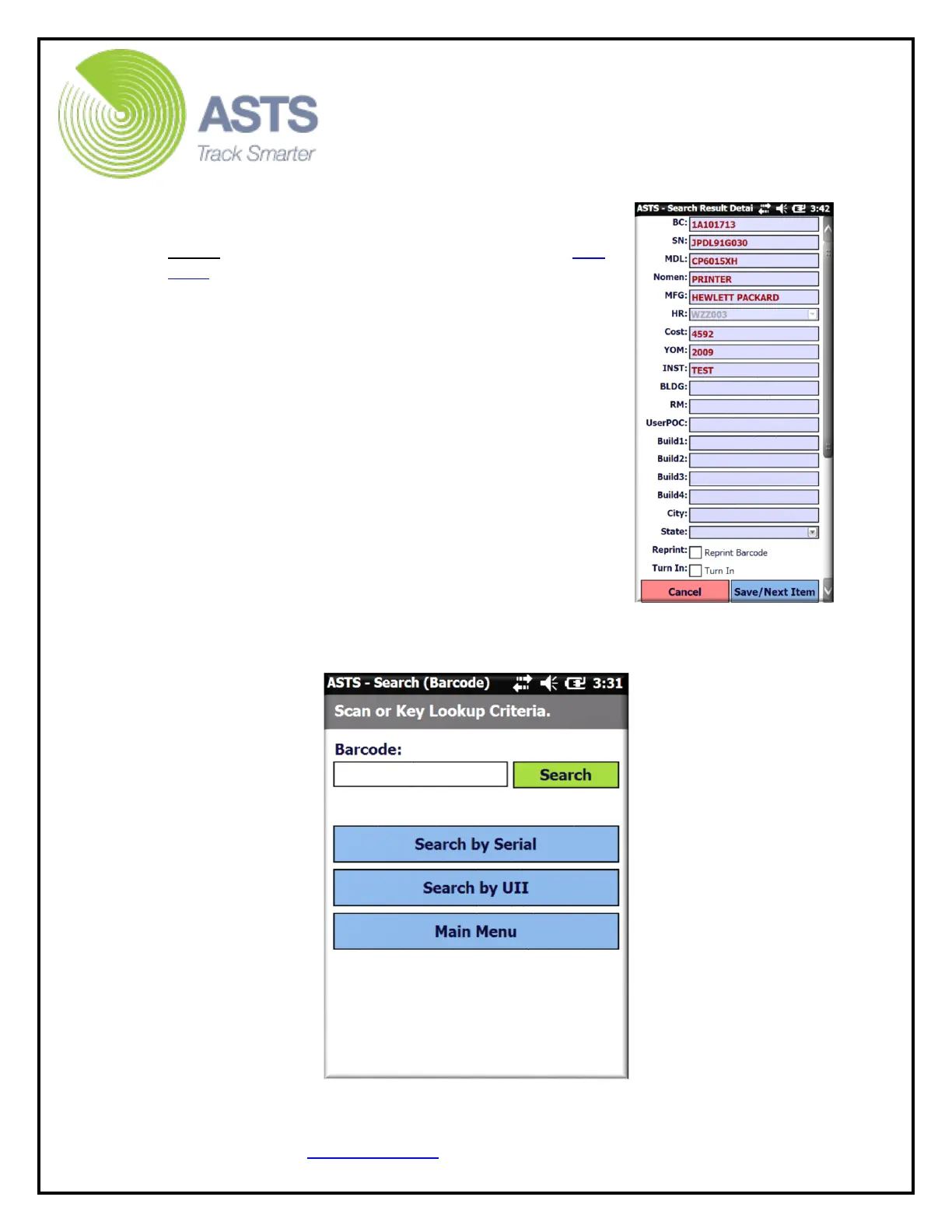
7. When the barcode number searched is found, the
Search Result screen displays the item information.
Note: If the barcode is not found, refer to the Add
Item section of this guide.
a. The information fields on the “Search
Results” can be edited to include the
locational data.
b. By clicking the “Reprint Barcode” checkbox,
an alert will be added to the ASTS
homepage for further action at a later time.
c. By clicking the “Turn In” checkbox, an alert
will be added to the ASTS homepage for
further action at a later time.
d. Clicking the “Save/Next Item” button saves
the changes and goes back to the “Search”
page.
e. Clicking the “Cancel” button returns back
and discards the scanned item.
8. After scanning the last item of the inventory (prior
to uploading the data from the scanner), click the
“Main Menu” button to navigate the ASTS scanner software back to the Main
Menu page.


 To Next Page