13
Environmental
WEEE and RoHS Compliance. MicroCue
2
and its associated accessories have
been manufactured and sold in accordance with the requirements of the EC WEEE
and RoHS directives. Please return all end-of-life items to your supplier, or
Interspace Industries directly, for appropriate disposal.
Packaging Materials:
Cardboard box: Grade 150 K/T ‘B’ (Single Walled Corrugated - Brown Kraft)
Electrical
CE Mark. MicroCue and its associated accessories have been designed,
manufactured and certified to comply with all requirements of the European CE
standard. Including EN 550103
Operating Instructions
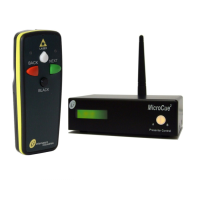
Unpacking and Connections. Unpack the main unit and place on a flat surface
within easy access for the Operator (see Fig 1). Connect the aerial to the BNC
connector on the rear of the main unit (see Fig 2) and position so the aerial is
vertical.
Power and Start up. MicroCue
2
can be powered using either the USB connection
to a computer or an optional 12VDC power pack (part number: PSU). After
connecting either power source to the main unit the system will do a short test,
during which the display on the main unit will flash green once, then red once. The
presenter control selector button will remain on to show that the system is working
correctly and both USB ports are enabled if computers are connected.
RF Signal Strength. A Green LED RF level indicator on the rear of the main unit
(see Fig 2) displays the RF signal strength of the handset when any cue button is
pressed. If any of the RF level indicator LEDs remain on between cues from the
handset then this is background RF signal interference which could reduce the
performance of MicroCue
2
. Try repositioning the main unit away from electrical/
electronic equipment to reduce this as much as possible.
Basic Operation. Check the system by momentarily pressing any of the handset
buttons to give a cue. The display on the main unit will strobe green if the
‘Next’ (green) button is pressed and red if the ‘Back’ (red) button is pressed.
Pressing the ‘Black’ button will cause the display to go fixed red to show it is in a
Black, paused state. Pushing any button will cause it to come out of Black/Paused
mode only.


 To Next Page