19
Trouble Shooting (Cont’d)
Symptom Try this
Handset does
not function
This can be because of 3 main reasons:-
First : Check the battery. Does the amber LED (on the Classic)
handset light up? If not change the 9V battery. On the Laser
handset do the Indicator LEDs light up to show anything? If there
is only red flashing – change the battery. If the correct colour
(when pressed) is shown followed by an amber light—change the
battery as it is low.
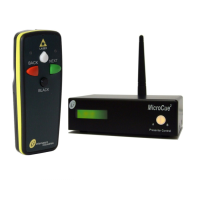
Second: ‘Learning’. Does the RF level on the rear of the Micro-
Cue2 show that a signal is made? If so then ‘learn’ the handset to
the unit.
Third: Have tried to ‘learn’ and nothing happens? Then possibly
the memory of handsets has exceeded 16 handsets and is full.
Press and hold the ‘learn’ button until the LED goes out (to erase
all handsets), then re-learn the new handset once again. If this
does not work - there may be a technical problem.
Battery life:-
Classic:
Laser:
The Classic and Laser handsets will stop transmitting if the battery
is at a low state as it could cause incorrect transmission (which is
prohibited). There is an automatic inbuilt electronic cut-off to avoid
this. The Classic will not show any LEDs on the transmitter if the
battery is dead – check by replacing the battery (PP3).
Laser handset: the indicator LEDs on the handset have 2 states
for battery indication. After a button has been pressed the LEDs
will show green, red or amber to correspond with the button
pressed, if the battery is low but working and, after 2 seconds after
these indications, the LEDs will flash amber twice. The battery
should (depending on use) last more than a day in this state.
Change the AA battery at your earliest convenience. If the LEDs
only flash RED, whatever button has been pushed, then the bat-
tery is nearly dead and needs replacing immediately. Of course a
fully flat battery will do nothing and will also need changing!


 To Next Page