Usage
4.2UsingTheBatteryCharger
CAUTION!
Riskofinjuryfromhotsurfaces
TheXLRplugcanbecomeveryhotduring
charging.
–DonottouchXLRplugduringcharging.
–DonotremoveXLRpluguntilmobilitydeviceis
fullycharged.
–Removemainsleadfrompowersocketand
waituntilXLRplugcooleddown.
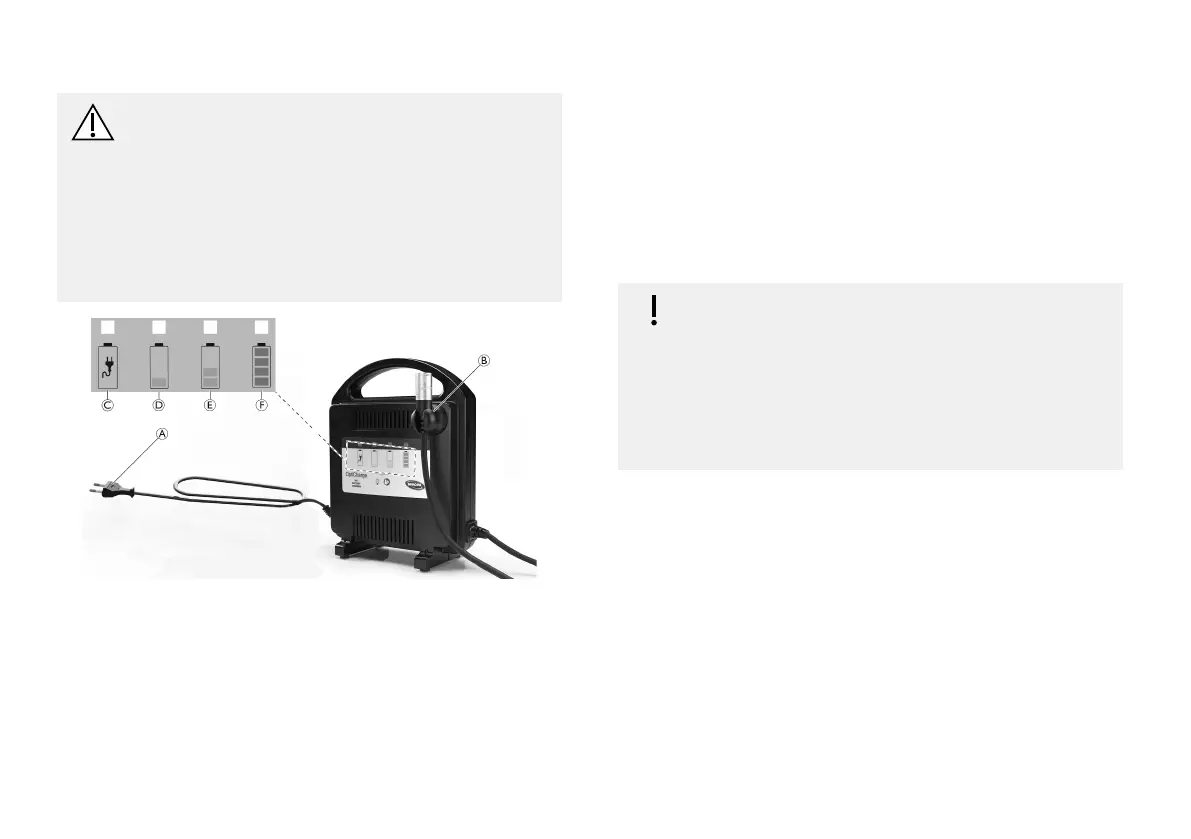
Fig.4-1
1.SwitchOFFmobilitydevice.
2.ConnectXLRplugBtomobilitydevicetobecharged.
3.ConnectthemainsleadAtoasuitablepowersocket.
BatterylevelindicatorLEDsD/E/Fashonce.
PowerLEDCilluminatesgreen.
Thisindicatesthatbatteryiscorrectlyconnectedand
ischarging.
4.Whenchargingiscompleterstdisconnectmainslead
frompowersocketandthenXLRplugfrommobility
device.
LEDIndication
IMPORTANT!
–Batteriesrepeatedlychargedtoandused
atpartlychargedlevelwillsufferagreatly
reducedbatterylife.
–Whileconnectedtoachargerthestateof
chargeshouldbereadsolelyfromthebattery
chargerindicatorsandnotfromthemobility
device.
“BatteryDischarged”LEDDilluminatesyellowwhenthe
batteryisdischargedandchargingisinprogress.Abattery
withalowchargestateshouldrechargeinapproximately
12hours.Smallerorpartlychargedbatterieswilltake
proportionallylesstimetobecomefullycharged.
“BatteryPartlyCharged”LEDEilluminatesyellowin
additionwhenthebatteryispartlycharged(>50%).A
mobilitydevicewithbatteriesatthischargelevelorbelow
mustbeusedinemergencysituationsonly.
“BatteryFullyCharged”LEDFilluminatesgreeninaddition
(allLEDsareon)whenthebatteryisfullycharged.
WhenLEDsDandEareashinganerrorhasoccurred:
1636951-C13


 To Next Page