
 Need help?
Do you have a question about the Invenco G6-300 and is the answer not in the manual?
Details permissible installation locations and environmental considerations for the G6-300 OPT.
Outlines essential safety measures and precautions before installing or servicing the G6-300.
Procedures for safely evacuating and barricading the area before accessing a fuel pump.
Instructions for safely shutting off electrical power to the unit before maintenance.
Warning against open flames near fuel stations due to ignition risk from fuel vapors.
Guidelines to prevent ignition from sparks and electrostatic discharge at fuel stations.
Recommendations for safe working practices, especially when working alone or with high voltages.
Essential safety steps to follow when working alone or with others for equipment maintenance.
States compliance with necessary European Directives for the CE mark.
Details FCC compliance rules and conditions for the G6-300 device.
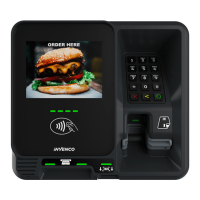
Identifies and labels the key components and features on the front of the G6-300 unit.
Requirements and procedures for installing a new Outdoor Payment Terminal (OPT).
Daily cleaning procedures and important warnings for maintaining the G6-300 unit.
Describes the G6-300's built-in tamper detection features and user checks.
Guides users on performing additional security checks on the G6-300.
Details inspection points for the G6-300 keypad, including its surround and privacy shield.
Inspection guide for the card slot, acceptor light, and contactless reader functionality.
Step-by-step instructions for safely removing the G6-300 from its installation.
Step-by-step instructions for correctly reinstalling the G6-300 unit.
Provides front and side dimension diagrams for the G6-300 unit.
 General
| Weight | 600g |
|---|---|
| Connectivity | Ethernet, WiFi |
| Card Reader | EMV, NFC |
| Payment Types | Credit, Debit |
| Security | PCI PTS 5.x |
| Ports | USB, Ethernet, Serial |

 To Next Page
