11
Introduction for buttons on remote controller
TIMER button
10
Ɣ
At ON status, press this button once can set TIMER OFF. The character of HOUR
TIMER
ON. After each pressing of "+" or "-" button, time will increase or decrease half an
Note:
Ɣ2XWGRRUDPELHQWWHPSHUDWXUHGLVSOD\PD\FDQ¶WEHVHOHFWHGIRUVRPHPRGHOV
:KHQLQGRRUXQLWUHFHLYHVVLJQDOLWGLVSOD\VLQGRRr set temperature.
Ɣ2QO\IRUWKHPRGHOZKRVHLQGRRUXQLWKas dual-8 displa\.
TEMP button
9
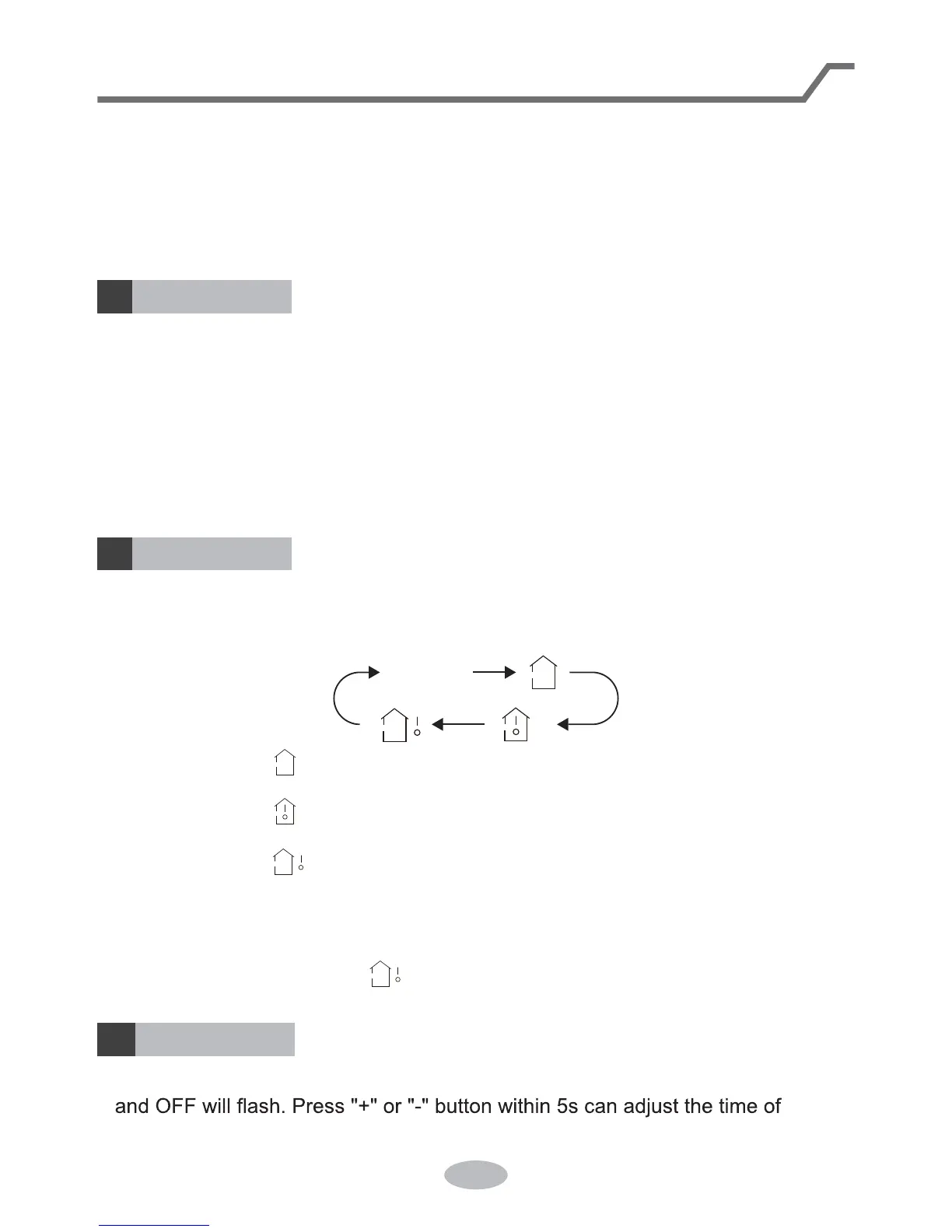
Press this button can see indoor set temperature, indoor ambient temperature or
outdoor ambient temperature on indoor unLW¶s displa\. THPSHUDWXUHLVVHWFLUFXODUO\
E\UHPRWHFRQWUROOHUDVEHORZ
QRGLVSOD\
Ɣ:KHQVHOHFWLQJE\UHPRWHFRQWUROOHURUQRGLVSOD\, temperature indicator on
LQGRRUXQLWGLVSOD\VVHWWHPSHUDWXUH
Ɣ:KHQVHOHFWLQJE\UHPRWHFRQWUROOHU, temperature indicator on indoor unit
GLVSOD\VLQGRRUDPELHQWWHPSHUDWXUH
Ɣ:KHQVHOHFWLQJE\UHPRWHFRQWUROOHU, temperature indicator on indoor unit
GLVSOD\VRXWGRRUDPELHQWWHPSHUDWXUH
SAVE function:
Under cool mode, press SAVE button and the unit will operate under SAVE mode.
Dual-8nixie tube on remote controller dispOD\V6(Air conditioner will operate at
DXWRVSHHG6HWWHPSHUDWXUHFDQ¶WEHDGMXVWHG3UHVV6$VE button again to exit
SAVE mode. Air conditioner turn back to original set speed and set temperature.
ƔThis function is applicable to partial of models.
X-FAN button
8
After pressing this button under cooling orGU\PRGHUHPRWHFRQWUROOHUGLVSOD\VWKH
character of "X-FAN" and X-FAN function is started up. Press this button again to
cancel X-FAN function. The character of "X-FAN" will disappear.
Note:
Ɣ
After starting up X-FAN function, when turning off the unit, indoor fan will continue
WRRSHUDWHIRUDZKLOHDWORZVSHHGWRGU\WKHUHVLGXDOZDWHULQVLGHWKHLQGRRUXQLW
Ɣ:KHQWKHXQLWRSHUDWHVXQGHU;)$1PRGHSUHVV;)$1EXWWRQFDQWXUQRII
;)$1IXQFWLRQ,QGRRUIDQVWRSVRSHUDWLRQLPPHGLDWHO\


 To Next Page