Thicknesser
Model DGI-63D
11
CHECKING, ADJUSTING AND
REPLACING KNIVES
1. When checking, adjusting or replacing the
cutterhead knives on the planer, proceed as
follows:
E
B
A. WARNING DISCONNECT MACHINE FROM
POWER SOURCE
B. Remove the top cover of the planer exposing the
cutterhead.
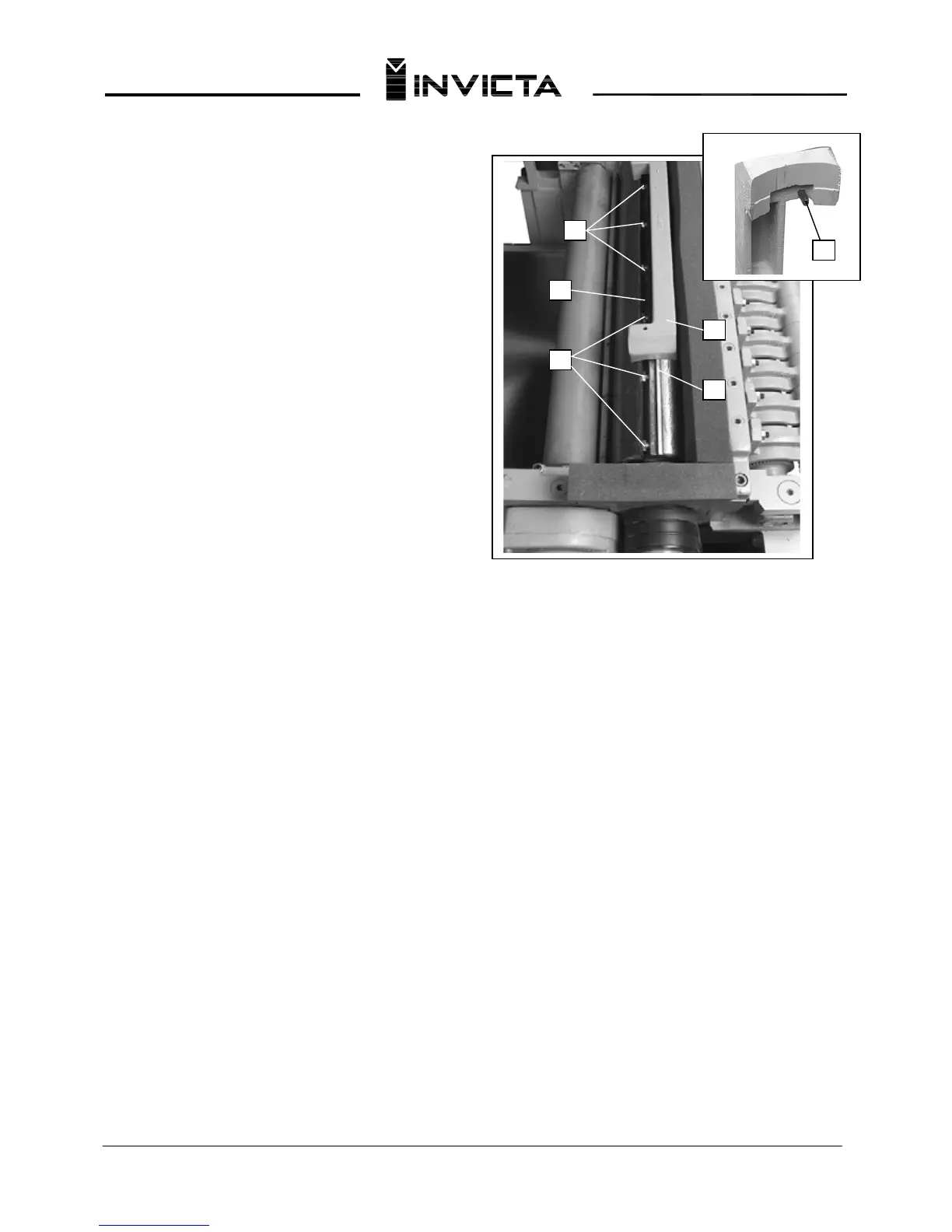
C. Check all four knives for proper setting using the
knife guage (A), as shown in Fig. 20. When the gu
age
(A) is placed on the cutterhead and the bottom of the
two roll pins, one of which is shown at (B), are against
the edge of the slot (C) opposite the knife, the knife
should just contact the bottom of the guage (D).
D. If any of the knives require an adjustment, slightly
loosen the knife locking bar of ea
ch of the four knives
by turning the knife locking screws (E) Fig. 20, into the
locking bar just enough to relieve stress in the
cutterhead but not disturb the setting of the four
knives.
E. To adjust the knife that must be reset, loosen all of
that knife's locking
screws (E) Fig. 20, by turning them
into the locking bar. As the knife locking bar becomes
loose, lifter springs under the knife will raise the knife
until it contacts the bottom of the guage (D). Then
snug up the knife locking bar by lightly backing out the
locking screws (E) against the knife slot.
IMPORTANT: AT THIS TIME, ONLY TIGHTEN THE
KNIFE INTO THE SLOT ENOUGH TO HOLD IT IN
POSITION. F. If additional knives must be reset,
repeat STEP C.
G. After all four knives are set with the screws just
snu
g, back out and tighte
n the locking screws, five of
which are shown at (E) Fig. 20, against the slot. Start
with the end screws first and proceed on alternate
sides toward the center screws until the knife is
securely held in the cutterhead. Tighten the remaining
three knives in the same manner.
2. WARNING IF THE KNIVES ARE TO BE
REMOVED FOR SHARPENING OR
REPLACEM
ENT, EXTREME CARE SHOULD BE
TAKEN AS THE KNIVES ARE VERY SHARP. TO
REMOVE THE KNIVES, WEAR GLOVES AND
PROCEED AS FOLLOWS:
A. WARNING DISCONNECT MACHINE FROM
POWER SOURCE
B. To remove each knife, loosen the knife locking
bar, by turning the locking screws, five of which are
shown at (E) Fig. 20, into the knife locking bar and
remove the locking bar, knife and springs located
under the knife.
C. Remove the remaining three knives in the same
m
anner.
D. Thorough
ly clean the knife slots, knife bars,
springs and scre
ws. If the threads appear worn or
stripped or if the heads are becoming rounded,
replace them.
E. Inspect the cutting edge of the knives for nicks or
wire
ed
ge.
Hone th
e
knives slightly using a stone or
if the knives are to be sharpened, maintain a cutting
angle of 40 degrees.
F. Insert springs, knives and knife locking bars into
all four slot
s in the cutterh
ead. Push
kn
ive
s down as
far as possible and back out locking screws, five of
which are shown at (E) Fig. 20, just enough to hold
all four knives in the cutterhead.
G. Adjust all four knives as explained in Step 1.
Fig. 20
C
A
E
D


 To Next Page
 Loading...