Addressable RGB-Cable Installation
07
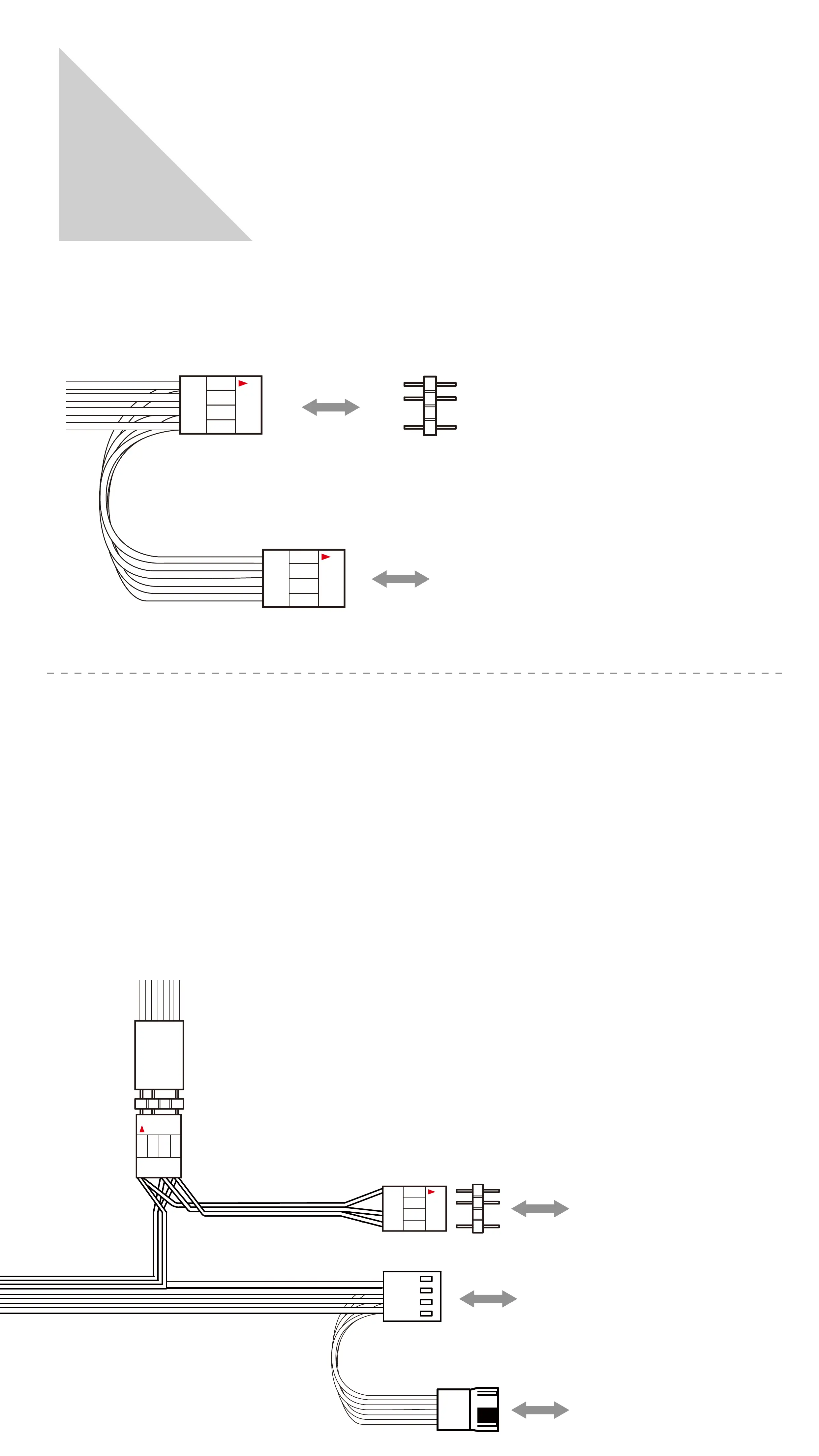
If your motherboard supports the addressable RGB effect,
please follow the direction of sign and connect as followed:
Connect the case’s addressable RGB Y-Cable to a motherboard’s addressable
RGB header.
Please install the 3-pin header to the available addressable RGB header of the case.
case’s addressable RGB
Y-Cable
Motherboard
Addressable RGB Header
3-Pin LED header
case’s addressable RGB
Y-Cable
The fan cable, addressable RGB Y-cable and their counterparts are attached to each.
Please connect as followed:
Installing the 1st fan: Connect the addressable RGB Y-cable to the available
3-pin addressable RGB header of the case. Connect the fan cable to
the motherboard’s fan header.
Installing the 2nd fan: Connect the addressable RGB Y-cable and connect it to the
available 3-pin addressable RGB header of the previous fan. Connect the fan cable
to the available fan header from the previous fan.
case’s addressable RGB
Y-Cable
2nd fan’s fan cable
2nd fan’s addressable RGB
Y-Cable
Motherboard
Fan Header
1st fan’s addressable RGB
Y-Cable
1st fan’s fan Cable


 To Next Page