Anti-Slip Strips Installation
Parts Require: Anti-Slip Strips
Remove the strip covers and place them under each corner.
08
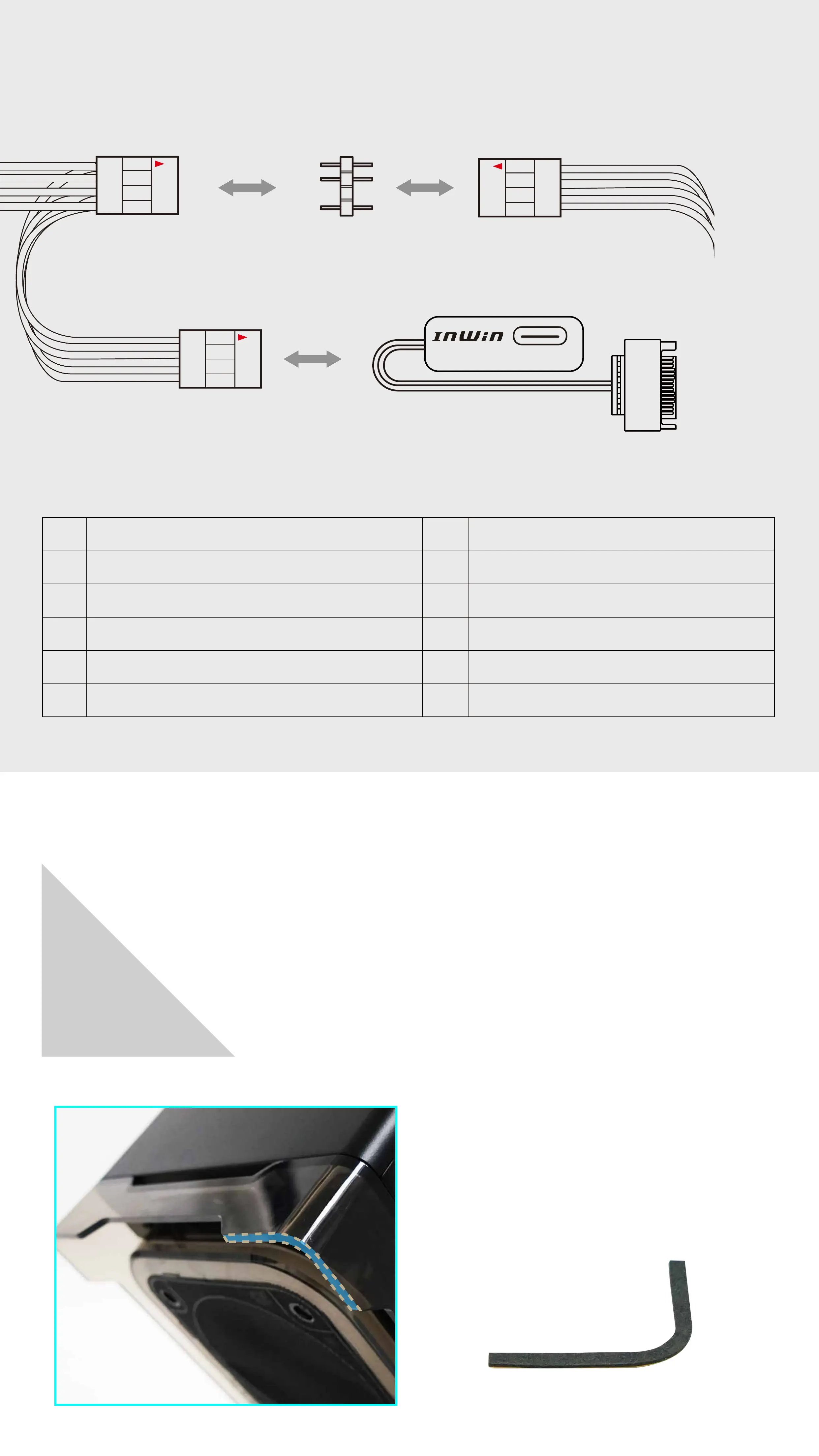
If your motherboard does not support an addressable header, please use the included
Fan RGB One-Click Controller to connect to your PSU’s SATA cable and the case’s
Addressable RGB Y-Cable in order to use the 11 different lighting effects.
case’s addressable RGB
Y-Cable
3-Pin LED header
case’s addressable RGB
Y-Cable
Fan’s addressable RGB
Y-Cable
Fan RGB One-Click Controller
SATA Power Input
Hold the button to turn on or off the lights. Tap the button to change the lighting modes.
*InWin reserves the right to change the lighting modes.
1 7
2 8
3 9
4 10
5
6
11
Rainbow
Breathing
Full Circle
Two-Tone Ring
Light at the end of the Tunnel
Diagonal Transition
LED-Red
LED-Green
LED-Blue
LED-White
Rotating LED Trio


 To Next Page