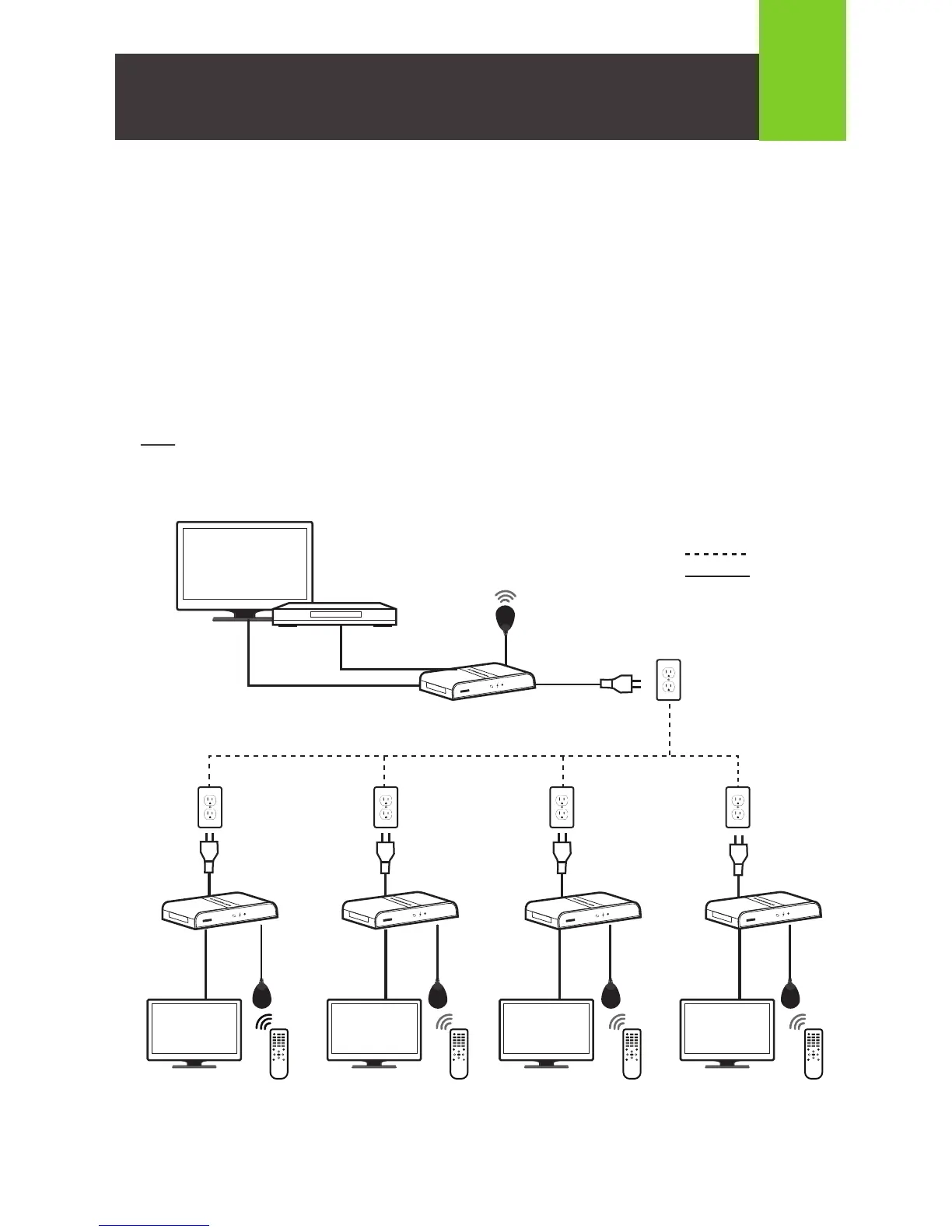
1. Connect the HDMI Input Port on the back of the Transmitter to the HDMI Output Port on your
video source using the included HDMI cable.
2. Connect IR Blast Cable to IR Out Port on the back of the Transmitter.
3. Connect the HDMI Output Port on the back of the Receiver to the HDMI Input Port on your
video display using the included HDMI cable.
4. Connect the IR Extension Cable to the IR In Port on the back of the Receiver.
5. Plug the power adapter cable into the power jack on both the Transmitter and Receiver.
Plug the power adapters into available power outlets.
Note: Follow steps 3~5 above to connect up to 3 additional receivers
3
Hardware Installation
IR IN
IR OUT
Blu-ray / DVD Player
IR IN IR IN IR IN
TV TV TV TV
Receiver
Transmitter
Receiver
Receiver
Receiver
Powerline
HDMI cable
IR INIR INIR INIR IN
IR OUT
HDMI OVER POWERLINE PRO KIT
RESET
......
HDMI OVER POWERLINE PRO KIT
RESET
......
HDMI OVER POWERLINE PRO KIT
RESET
......
HDMI OVER POWERLINE PRO KIT
RESET
......
ON
OK
ON
OK
ON
OK
ON
OK
HDMI OVER POWERLINE PRO KIT
RESET
......



 To Next Page