Installation Instructions–English
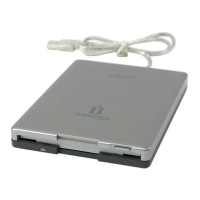
1. Connect the USB cable to a USB port on the computer.
2. Insert the Drivers CD to install the drivers.
NOTE: Installing the drivers indicates that you accept
the terms of the software license agreement included on the CD. If the license
agreement does not open automatically when you insert the CD, browse the
CD and read the license agreement before installing the drivers.
Windows Me/XP Users:
Follow the instructions for your operating system.
Windows 98/98SE/2000 Users:
The
Add New Hardware Wizard
will open. To
locate the drivers, click
Next
. Click the
Search for the best driver
button, click
Next
. Put a check in the box for
Specify a location
. Click
Browse
and select
the folder for your operating system on the Drivers CD.
3. The Floppy USB drive icon will appear in
My Computer
or
Windows Explorer
.
Mac Users:
The drive icon will appear on your desktop when you insert a
floppy disk.
Get great benefits from Iomega when you register!
• Exclusive promotional offers and discounts
• Notification of product launches, upgrades and updates
• Protection and control of your privacy
If you have not already registered, go to
www.iomegareg.com
. It's fast and easy.








 To Next Page