EasyManua.ls Logo

Iomega ScreenPlay Director - User Manual

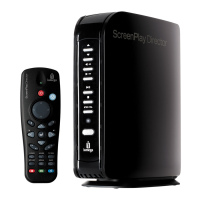
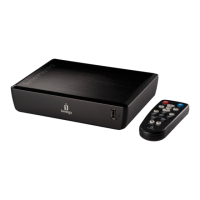
Iomega ScreenPlay Director
44 pages
Print Icon
To Next Page IconTo Next Page
Loading...
Quick Start Guide
Guide de démarrage rapide
Schnellstart-Handbuch
Guida di installazione rapida
Guía de instrucciones rápidas
Guia de uso rápido
Snel aan de slag
Snabbstartguide
Introduktion
Hurtigreferanse
Pikaopas
Gyors útmutató
Stručná příručka
Wprowadzenie
Краткое руководство по началу работы
Οδηγός γρήγορης εκκίνησης
zlı Başlamalavuzu
ScreenPlay
Director
HD Media Player
Question and Answer IconNeed help?

Do you have a question about the Iomega ScreenPlay Director and is the answer not in the manual?

Summary

Getting Started

Connecting and Setting Up ScreenPlay Director

Connecting the ScreenPlay Director to Your TV

Use HDMI for HD performance, composite AV cable for others.

Connecting the ScreenPlay Director to Your Network

Connect via wired Ethernet cable or supported wireless WiFi adapter.

First Time Setup

Playing Media Content on Your TV

Online Media

Troubleshooting

TV Screen Display Issues

Press TV SYS button to cycle through video output settings.

Remote Control Not Responding

Check remote aiming, power, and battery installation.

Complete Users Manual

Summary

Getting Started

Connecting and Setting Up ScreenPlay Director

Connecting the ScreenPlay Director to Your TV

Use HDMI for HD performance, composite AV cable for others.

Connecting the ScreenPlay Director to Your Network

Connect via wired Ethernet cable or supported wireless WiFi adapter.

First Time Setup

Playing Media Content on Your TV

Online Media

Troubleshooting

TV Screen Display Issues

Press TV SYS button to cycle through video output settings.

Remote Control Not Responding

Check remote aiming, power, and battery installation.

Complete Users Manual

Iomega ScreenPlay Director Specifications

General IconGeneral
Resolution SupportUp to 1080p
Network ProtocolsDLNA, UPnP
Video Formats SupportedAVI, MP4, MKV
Audio Formats SupportedMP3, WMA, AAC
Image Formats SupportedJPEG, BMP, PNG
ConnectivityHDMI, Component Video, Composite Video, Ethernet
Video Codecs SupportedH.264, MPEG-1, MPEG-2, MPEG-4
Audio Codecs SupportedMP3, WMA, AAC
Subtitle Formats SupportedSRT, SUB, SSA
Storage CapacityNone (HDD not included)

Related product manuals