5
Rear Panel
Features
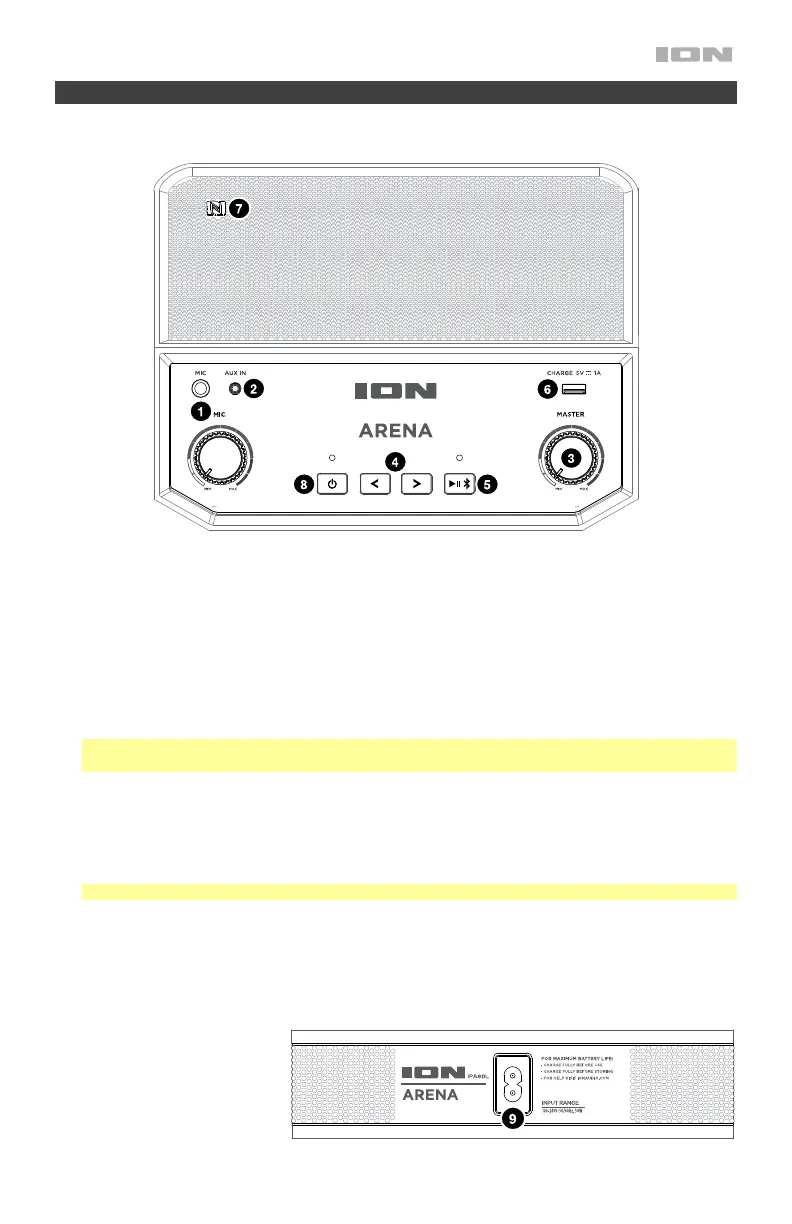
Top Panel
1. Microphone Input with Volume Control (1/4"): This mono input accepts a 1/4" audio source such as
a microphone, guitar, or other musical instrument. The volume knob controls the signal level of the
device plugged into this input.
2. Auxiliary Input (1/8”): This stereo 3.5 mm (1/8”) input can be used to connect a CD player, MP3 player,
or other audio source.
3. Master Volume Control: This adjusts the speaker’s main mix volume, which includes the Microphone
Input, Auxiliary Input, and the audio of a paired Bluetooth device.
4. Track Buttons: Use these buttons to go to the previous/next track on a Bluetooth-connected device.
Press and hold both Track buttons at the same time to disable (or enable) voice prompts.
Note: With some apps, pressing the Track – button or Track + button may go to another playlist or
music genre.
5. Play/Pause/Bluetooth: Press this button to play or pause a track from a paired Bluetooth device.
Press and hold this button to disconnect a paired Bluetooth device. If the Arena is paired with a device,
the Bluetooth LED on this button will be lit. If not paired, the LED will be unlit.
6. USB Charging Port: Connect your device’s charge cable here to charge it. USB charging only
functions when the unit’s power is turned on.
Note: To charge smartphones and tablets faster, put the device’s screen to sleep.
7. NFC (near-field communication): Touch and briefly hold your supported and enabled device to the NFC
logo to pair the device.
8. Power ON/OFF Switch: Press and hold this button for 3 seconds to power Arena on/off. Please note
that while Arena is connected to a power source, it does not need to be powered on to charge the
battery.
9. Power Cable Input: Insert
the included power cable
here to charge the unit. Note
that the Arena can be used
with the power cable while it
simultaneously charges the
battery.


 To Next Page