3
LINK
LINK
LINK
Quick Setup
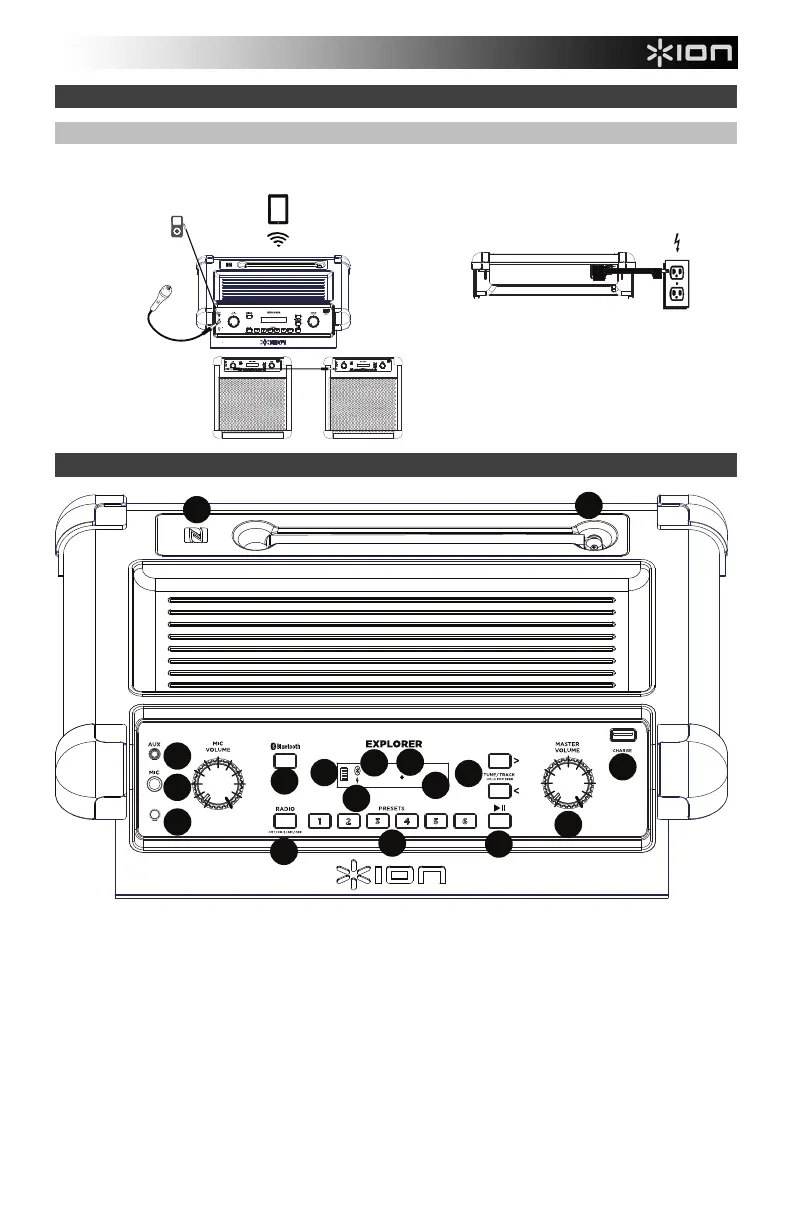
Connection Diagram
Items not listed under the Box Contents are sold separately.
Features
1. Microphone Input with Volume Control (1/4"): This mono input accepts a 1/4" input such as a microphone, guitar, or
other musical instrument.
2. Auxiliary input: This stereo 3.5 mm (1/8”) input can be used to connect a CD player, MP3 player, or other audio
source.
3. Bluetooth Button: Press the Bluetooth button to disconnect a paired Bluetooth device.
4. Speaker Link: Connect two or more Explorers together using a 1/8” (3.5 mm) stereo aux cable. A 2’ cable is included
but a longer one can be purchased from a local electronics retailer.
5. Bluetooth Icon: The Bluetooth icon will not be lit when Explorer is first powered on (unless it was previously paired
with a device). The Bluetooth icon will be lit solid when a device is paired to Explorer.
6. Master Volume Control: This adjusts the speaker’s main mix volume, which includes the Microphone Input, Auxiliary
Input, Radio, and the audio of a paired Bluetooth device.
REAR PANEL
POWER
(for charging)
TOP PANEL
MICROPHONE
MP3
PLAYER
TABLET
LINKING TWO
EXPLORER
iPA76Ss
LINK
13
14
16
17
15
12
10
11





 To Next Page