EasyManua.ls Logo

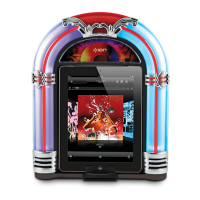
ION JUKEBOX DOCK - User Manual

ION JUKEBOX DOCK
16 pages
Print Icon
To Next Page IconTo Next Page
Loading...
JUKEBOX DOCK
QUICKSTART GUIDE
ENGLISH ( 3 – 4 )
GUÍA DE INICIO RÁPIDO
ESPAÑOL ( 5 – 6 )
GUIDE D'UTILISATION RAPIDE
FRANÇAIS ( 7 – 8 )
GUIDA RAPIDA
ITALIANO ( 9 – 10 )
KURZANLEITUNG
DEUTSCH ( 11 – 12 )
SNELSTARTGIDS
NEDERLANDS ( 13 – 14 )
Question and Answer IconNeed help?

Do you have a question about the ION JUKEBOX DOCK and is the answer not in the manual?

Summary

Quickstart Guide (English)

Box Contents

Lists all items included in the JUKEBOX DOCK package.

Product Registration

Instructions for registering the JUKEBOX DOCK online for updates and support.

iOS Device Compatibility

Lists the iOS devices compatible with the JUKEBOX DOCK.

Setup Instructions

Step-by-step instructions for connecting and using an iOS device with the JUKEBOX DOCK.

Front Panel

Dock Release Lever

Lever to lean the iOS device forward for easy removal from the dock.

Dock Connector

Port for connecting the iOS device onto the 30-pin connector.

Speakers

Output for audio playback from the connected iOS device.

Rear Panel

Power Connection

Port for connecting the power adapter to the JUKEBOX DOCK.

Line In Port

Input for connecting external audio sources like CD players.

Main Power Button

Button to turn the JUKEBOX DOCK on or off.

Specifications

Speaker Output

Specifies the speaker output power and frequency.

Power Requirements

Details the power input required for the JUKEBOX DOCK.

Summary

Quickstart Guide (English)

Box Contents

Lists all items included in the JUKEBOX DOCK package.

Product Registration

Instructions for registering the JUKEBOX DOCK online for updates and support.

iOS Device Compatibility

Lists the iOS devices compatible with the JUKEBOX DOCK.

Setup Instructions

Step-by-step instructions for connecting and using an iOS device with the JUKEBOX DOCK.

Front Panel

Dock Release Lever

Lever to lean the iOS device forward for easy removal from the dock.

Dock Connector

Port for connecting the iOS device onto the 30-pin connector.

Speakers

Output for audio playback from the connected iOS device.

Rear Panel

Power Connection

Port for connecting the power adapter to the JUKEBOX DOCK.

Line In Port

Input for connecting external audio sources like CD players.

Main Power Button

Button to turn the JUKEBOX DOCK on or off.

Specifications

Speaker Output

Specifies the speaker output power and frequency.

Power Requirements

Details the power input required for the JUKEBOX DOCK.

ION JUKEBOX DOCK Specifications

General IconGeneral
BrandION
ModelJukebox Dock
CategoryJukebox
CompatibilityiPod, iPhone
SpeakersBuilt-in
ConnectivityDock connector
Power SourceAC Adapter
Audio Output3.5mm headphone jack