4
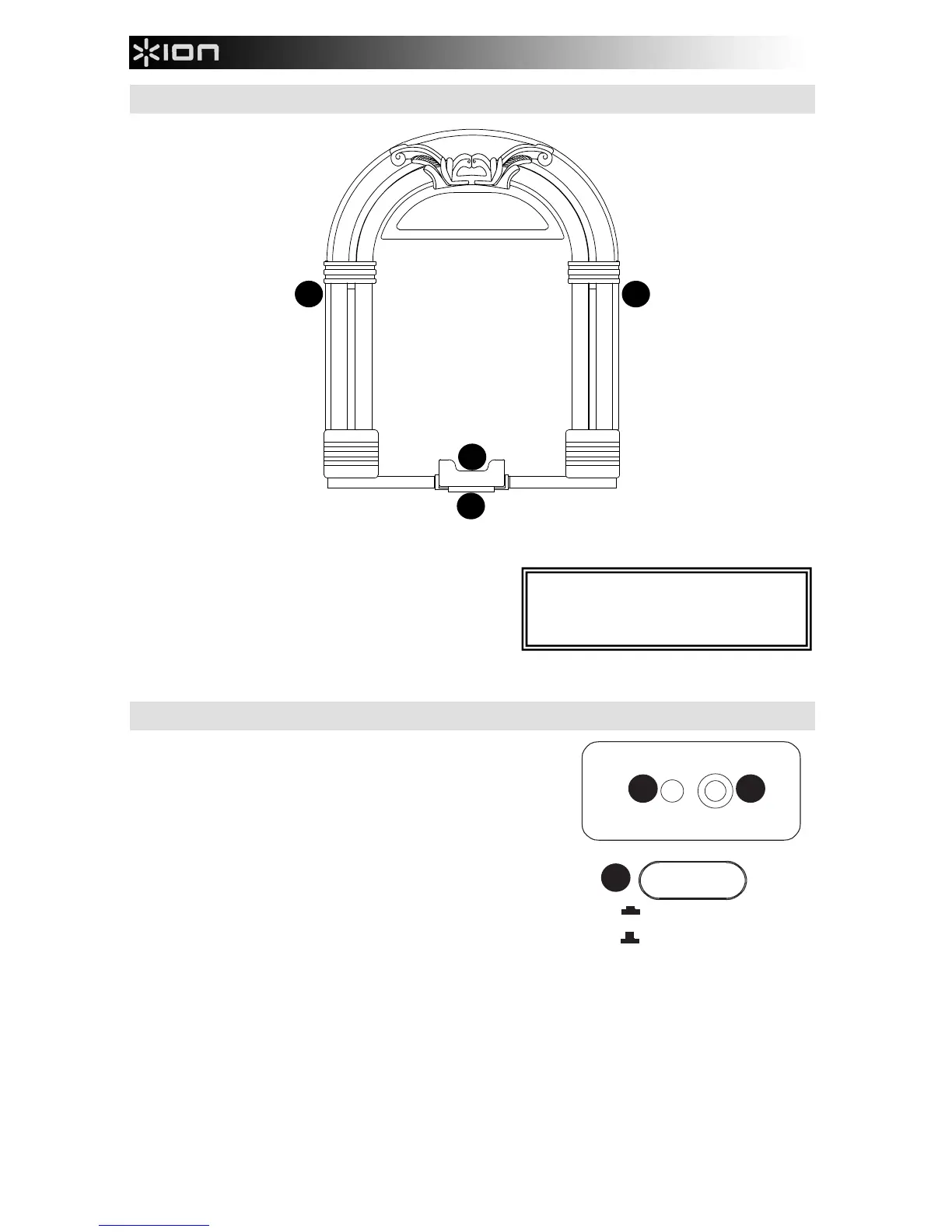
FRONT PANEL
1. DOCK RELEASE* – When this lever is pressed down, the
iOS device will lean forward, allowing you to easily grasp
and pull up the iOS device, removing it from the dock.
2. DOCK – To connect your iOS device to JUKEBOX DOCK,
gently slide it onto the 30-pin connector here.
3. SPEAKERS – Plays back the audio from your iOS device.
Select from your iTunes library or favorite jukebox app (works with most jukebox apps).
REAR PANEL
1. POWER – Use the included power adapter (12V DC, 3A, center pin-
positive) to connect JUKEBOX DOCK to wall power.
2. LINE IN – This stereo 1/8” line-level input can be used to connect a
CD player, MP3 player, or other audio source. To adjust the volume
of the audio signal, adjust the output volume of your audio source.
3. POWER BUTTON – Press this button to turn JUKEBOX DOCK on
or off.
*Note: To ensure safe removal of your iOS
device, gently press the DOCK RELEASE
down and securely grasp the iOS device
when it leans forward from the dock.
LINE IN
DC 12V


 To Next Page