This document is a user manual for a Foot Spa device, model SUK-805D, designed for detoxification and therapeutic purposes.
Function Description
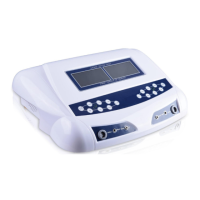
The Foot Spa device is primarily used for ionic foot baths, which aim to enhance ionic conduction in the body. It features multiple working modes, including various low-frequency acupuncture, massage, stroke, scrapping, and manipulation modes. Additionally, it incorporates a Far Infrared (FIR) Belt function and Transcutaneous Electrical Nerve Stimulation (TENS) plates for broader therapeutic applications. The device is designed to be user-friendly, with a clear display showing mode, time, data, grade, voltage, and ion concentration.
Important Technical Specifications
- Model: SUK-805D
- Power: 130W
- Frequency: 50Hz-60Hz
- Electric Current: 0-3.0A
- Input Power: AC110V-240V
- Output Power: 0-20V
- Ion Concentration Range (Optimal): 2.5-2.8
- FIR Belt Working Period: 30 minutes
- TENS Plates Working Period: 30 minutes
Usage Features
The device comes with several parts:
- Main Body: The central control unit.
- Array (x2): These are placed in the basin for the foot bath.
- Electrode Plate (x4): Used for TENS therapy.
- Electrode Wire (x2): Connects the electrode plates to the main body.
- FIR Belt (x2): Provides far infrared therapy, worn around the waist or thigh.
- Power Cord (x1): Connects the device to the power source.
- Wrist Band (x2): Worn during operation, possibly for grounding or monitoring.
Operating Instructions:
- Connection: Connect the main frame to the power source and all provided parts (arrays, electrode plates, FIR belt) to the main frame. Ensure the device is placed on a dry and stable surface.
- Power On: Turn on the machine using the power button on the back of the main frame.
- Array Placement: Place the arrays into a basin, ensuring they are fully submerged in water.
- Salt Addition: Add approximately 0.1g of sea salt to the bath water to enhance ionic conduction.
- Cycle Start: Press the corresponding touch key to start the desired working cycle.
Panel Instructions:
The control panel includes:
- Working Mode Switching Button (A/B MODE): Selects between different working modes.
- Time Adjusting Button (A/B Time): Adjusts the duration of the working cycle.
- FIR Switching Button (A/B Belt): Activates and adjusts the FIR belt intensity (Low, Medium, High).
- TENS Mode Adjusting Button (A/B MODE - lower): Selects the desired TENS mode.
- Intensity Increasing/Decreasing Button (+/-): Adjusts TENS intensity.
- Start/Stop Button: Initiates or pauses the working cycle and saves settings for the upper A/B MODE and A/B Time.
- ON/OFF Button: Controls the lower A/B MODE and +/- buttons for TENS function.
- Power Switch: Turns the device on/off.
Working Modes:
The manual details eight distinct working modes, each with specific positive and negative pulse percentages:
- Mode 1: (+)100%, (-)0%
- Mode 2: (-)100%, (+)0%
- Mode 3: (+)15%, (-)10%, (+)5%, (-)70%
- Mode 4: (-)10%, (+)15%, (-)5%, (+)70%
- Mode 5: (-)50%, (-)50%
- Mode 6: (+)50%, (-)50%
- Mode 7: (-)70%, (+)30%
- Mode 8: (+)70%, (-)30% (most practical, suitable for most people, time adjustable).
Ion Concentration Adjustment:
The ion concentration value is displayed on the lower right corner of the screen.
- Optimal Range: 2.5-2.8.
- Low Concentration (<0.6): An icon will flash, indicating more salt is needed.
- High Concentration (>3.0): An icon will flash, and a beep sound will occur, indicating more water is needed. Users should add water to lower the concentration to 3.0 or adjust the intensity to 1 or 2.
- Automatic Shutdown (>3.3): The machine will automatically stop working if the ion concentration exceeds 3.3.
FIR Belt Usage:
Connect the FIR belt to the main body and tie it around the user's waist or thigh. Press the "A/B Belt" button to activate. The "L" icon indicates low intensity. Repeated presses cycle through Low, Medium, and High intensities. The FIR belt operates for 30 minutes.
TENS Plates Usage:
Connect the TENS plates to the main body and attach them to acupuncture points on the body. Press the "ON/OFF" button to activate. The "Manipulation" icon will flash. There are five working modes, adjustable via the "A/B MODE" button. The working intensity is indicated by an icon and can be adjusted with the "+/-" buttons. TENS plates operate for 30 minutes.
Maintenance Features
Troubleshooting:
The manual provides a troubleshooting guide for common issues:
- No values displayed/Screen displays zero:
- Possible Cause: Wrist Band enters protection mode.
- Action: Unplug and reboot. Press STOP then START twice.
- Black screen/Screen displays zero:
- Possible Cause: Power supply not connected.
- Action: Check power plug.
- Possible Cause: Fuse burned out.
- Action: Replace fuse.
- Possible Cause: Power switch not turned on.
- Action: Turn on power source.
- Machine stops working:
- Possible Cause: Array not connected.
- Action: Check array plug.
- Possible Cause: Array is broken.
- Action: Replace array.
Array Lifespan:
The array is typically used for 50-60 sessions. If the array stops working, there will be no color change in the process.
Cautions:
The device should never be used by individuals:
- Using a pacemaker.
- With a heart condition or epilepsy.
- Who are pregnant.


 To Next Page
 General