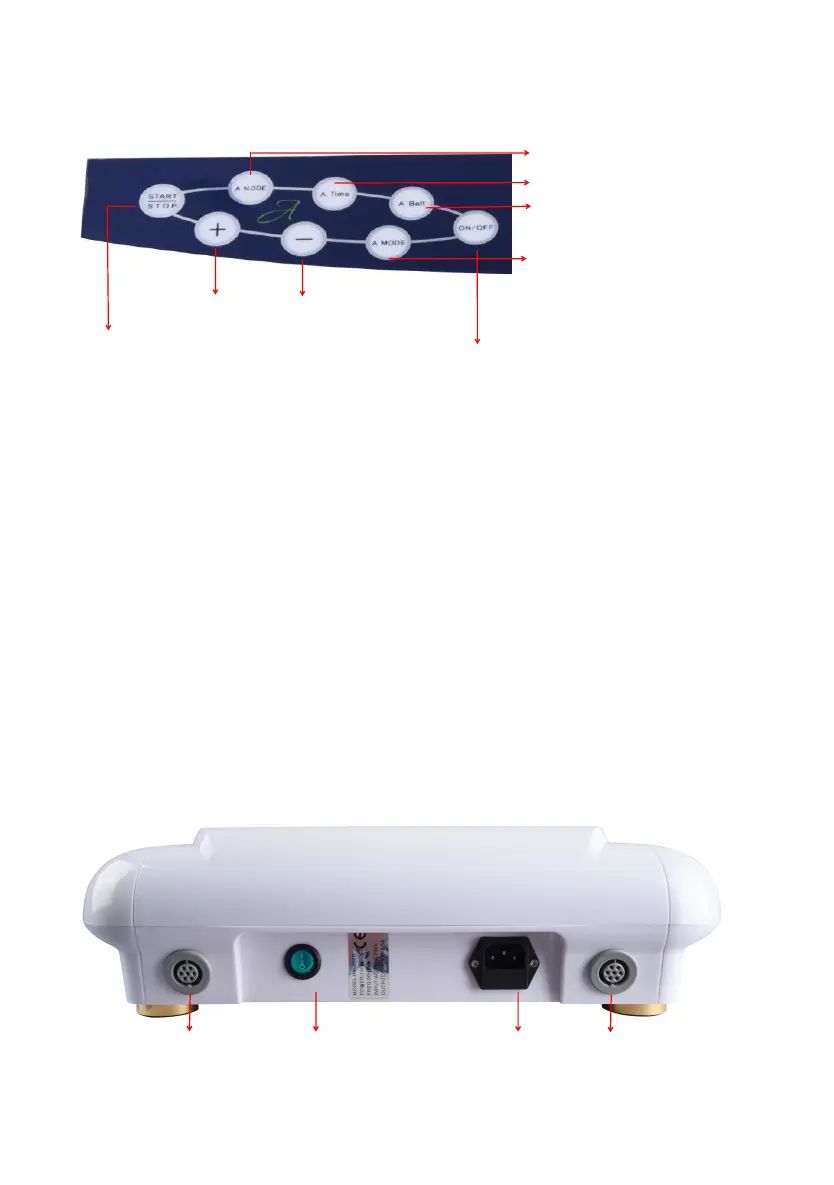
PANEL INSTRUCTIONS
Working Mode Switching Button
Intensity Increasing/Decreasing Button
TENS mode Adjusting Button
Power Switch Power Cord Port
Start/Stop the Working Cycle
1. Once the machine is energized, press the upper A/B MODE button to select the desired
2. Press the A/B Time button to select the desired working cycle.
3. Press button START/STOP to start the working cycle.
4. Press the ON/OFF button.
5. Press the lower A/B MODE button to select the desired TENS mode.
6. Press the button + or - to adjust TENS intensity.
7. Press the A/B Belt button to select the desired belt function.
Please select the desired working mode before pressing the START/STOP button. Press
the START/STOP button to save all settings and then no setting can be modified.
START/STOP button is supposed to control the upper A/B MODE and A/B Time button
while the ON/OFF button is supposed to control the lower A/B MODE button and +/-
button.
TENS refers to Transcutaneous Electrical Nerve Stimulation. It is the use of electric
current produced by a the electrode plates to stimulate the nerves for therapeutic
purposes, intending to reduce both acute and chronic pain.


 To Next Page