Need help?
Do you have a question about the iOttie iON Wireless Stand and is the answer not in the manual?
Lists the components included with the iON Wireless Stand.
Explains faster charging speeds and capacity for iPhone and Android.
Describes the 65-degree tilt for content viewing while charging.
Details anti-slip pad and base for device safety and stability.
Shows typical Qi coil placement in smartphones for alignment.
Guides on positioning the device vertically or horizontally for charging.
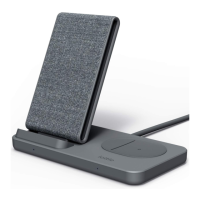
The iON Wireless Stand is a fast wireless charger designed to provide convenient and efficient charging for Qi-compatible smartphones. This device serves as a stand, allowing users to view content on their phone while it charges.
The primary function of the iON Wireless Stand is to wirelessly charge Qi-enabled smartphones. It supports fast wireless charging for both iPhone (up to 7.5W) and Android devices (up to 10W), offering a quicker charge compared to standard wireless chargers. The stand incorporates two Qi coils, enabling charging in both portrait and landscape orientations, which enhances its versatility for different viewing preferences.
The device includes a USB-C port for input and a charging indicator on the side. It features anti-slip pads and an anti-slip base to ensure device stability during charging and prevent shifting on various furniture surfaces.
To use the iON Wireless Stand, connect the included USB-C charging cable to the USB-C port on the back of the stand, and then connect the USB-A side to the provided power adapter. Plug the power adapter into an AC outlet. The charging indicator will briefly turn on and then fade, signaling that the stand has received power.
For optimal performance, it is crucial to use the included cable and power adapter. If a third-party charger is used, it must be a Qualcomm Quick Charge 3.0 or equivalent adapter with a minimum output of 9.0V-2.0A or 12V-1.5A to support Qi fast charge. Plugging the charging stand into a computer will not provide adequate power for wireless fast charging.
The stand is designed with a 65-degree tilt, providing an ideal viewing position for content while the device charges. The two Qi coils allow for flexible placement of the smartphone in either portrait or landscape mode. For portrait charging, align the center of the smartphone vertically to the charging surface and rest it on the anti-slip pad until a charging connection is established. For landscape charging, align the center of the smartphone horizontally to the charging surface and rest it on the anti-slip pad. It is important to rest the smartphone parallel to the charging stand for efficient charging.
The charging indicator on the side of the device provides visual feedback on its status:
The manual emphasizes several operational warnings to ensure the longevity and safe use of the device:
iOttie is not liable for possible damages due to product misuse. For any questions or troubleshooting, customers are advised to contact customer service at cs@iottie.com. The product comes with a 2-year warranty.
 General
| Brand | iOttie |
|---|---|
| Model | iON Wireless Stand |
| Category | Battery Charger |
| Language | English |

 To Next Page