IOXUS
18 Stadium Circle
Oneonta, NY 13820
Toll Free: +1 877-751-4222
sales@ioxus.com 2/17/2021
DOC 1-0004 Rev B
© 2021 Ioxus. All rights reserved.
required). Selection of cable size is based on voltage drop requirements for a vehicle’s starting and charging
systems. Refer to TMC RP 105C to determine minimum cable size requirements.
Mechanical
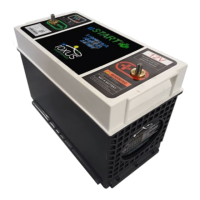
It is desirable to install uSTART
®
electrically closest to the starter or in the location where the starter cable is
designed to terminate. However, the unit will perform well even installed remotely. Regardless, it must be
installed electrically in parallel with at least one 12V battery using appropriately sized cables and hardware.
Start from a point that all the cables both positive (+) and negative (-) are disconnected and fastened out of
the way for installation or not installed in the vehicle yet. Install the battery(ies) and uSTART
®
in their
appropriate locations.
When installing uSTART
®
it is important to consider the battery hold down being used and how uSTART
®
relates to any batteries being mounted with it.
uSTART
®
is designed to be installed using the existing Group 31 battery hardware. Install uSTART
®
using the
existing Group 31 battery hardware and torque specifications. For custom installations please contact Ioxus
Customer Service for additional support.
Electrical
Refer to the Wiring Diagrams
section for typical vehicle wiring before and after uSTART
®
installation.
1. Connect the vehicle positive (+) battery cable and Starter Solenoid positive (+) cable to the positive
(+) terminal of uSTART
®
.
2. Connect the vehicle positive (+) battery cable to the positive (+) terminal(s) of the battery(s).
3. Connect the vehicle negative (-) battery cable and Starter Solenoid negative (-) cable to the negative
(-) terminal of uSTART
®
.
4. Connect the vehicle negative (-) battery cable to the negative (-) terminal(s) of the battery(s).
5. The solid yellow LED indicates that uSTART
®
is in Maintenance Mode and connected to a
battery.
6. uSTART
®
is now ready to support the vehicle. uSTART
®
will automatically enter Run Mode when
the vehicle starts. The yellow LED flashes in Run Mode after a new uSTART® installation while
uSTART
®
ultracapacitors are initially charged. Once the ultracapacitors are charged, Run Mode is
denoted by a solid green LED.


 To Next Page