■
Change Password
■
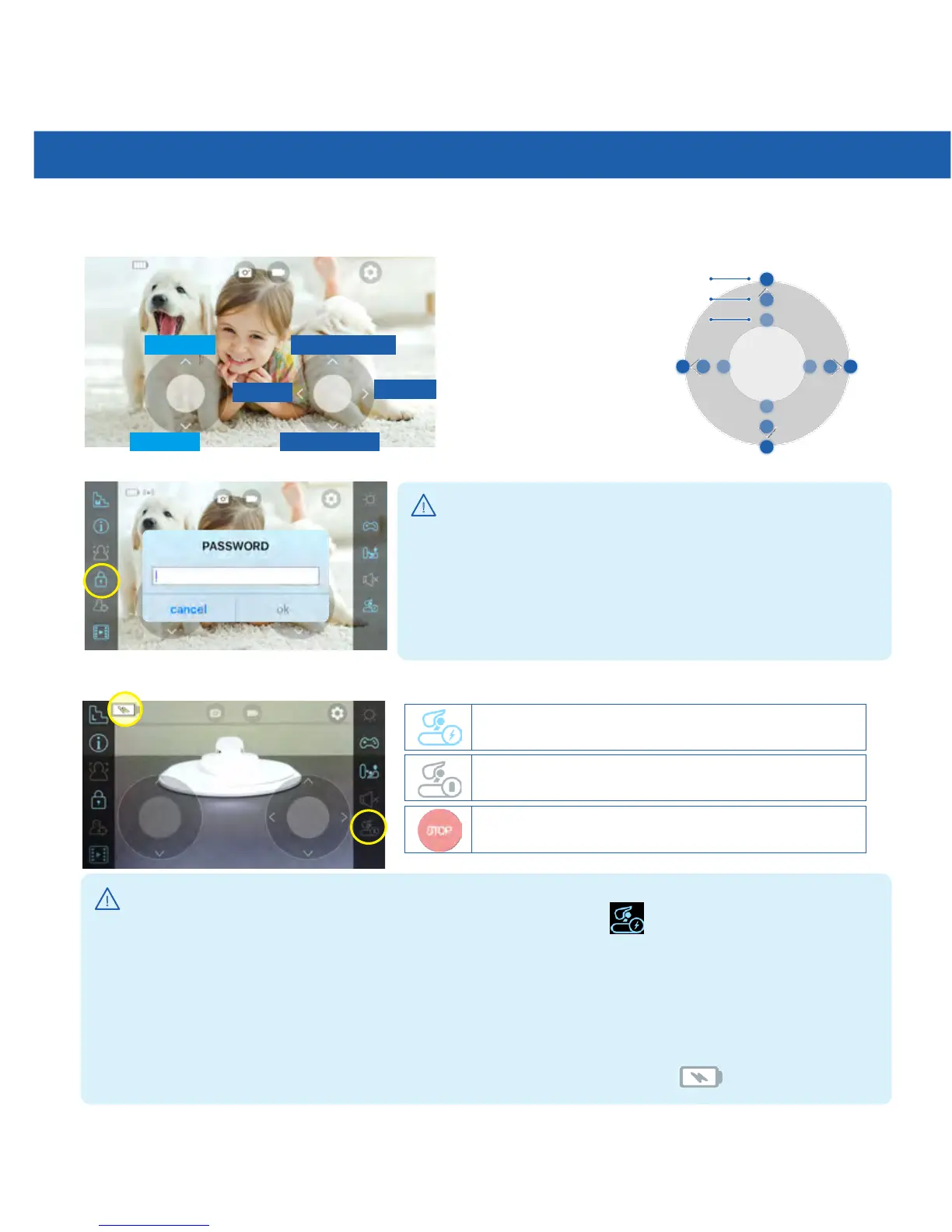
Joystick/Password Setting
Speed adjustable Tip!
High-speed
Medium-speed
Low-speed
Head Up
Going Forward
Turn Right
Turn Left
Going Backward
Head Down
■
Automatic Docking Function
Undocking
CancelAutomaticDocking
AutomaticDocking
Detailed Function Explanation
!
!
Useful Tips
Useful Tips
*Tocharge,movetheRileynearthechargingstationandpress.
*Duringcharging,theRileydoesnotmovebackandforthbutonlythestationisavailableto
rotate.
* Please move Riley toward the charging station within
50
cm (
20
”) and directly face charging
stationbeforeinitiatingauto-dockingprocess.
* Please use controls to rotate Riley’s camera direction while charging.
*Ifthesiliconebeltisdirty,Rileymayfailtodock.Pleaseremovethedustanduse.
*WhiletheRileyisonthechargingstation,pleasemakesuretocheckifisshowing.
*PleasechangeRiley'spasswordbyclickinglock-button,
for your security.
*Whenyouresettherobot,thepasswordinitializedto
"
1234
".
*Whenoneoftheuserchangesthepassword,allofthe
users’ password need to be changed.
▶
Youcanadjustthespeedbymovingthejoystickwhilepressingit.



 To Next Page