EasyManua.ls Logo

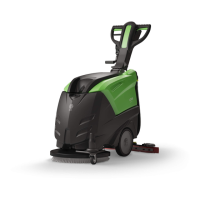
IPC CT110 - User Manual

IPC CT110
2 pages
Print Icon
To Next Page IconTo Next Page
Loading...
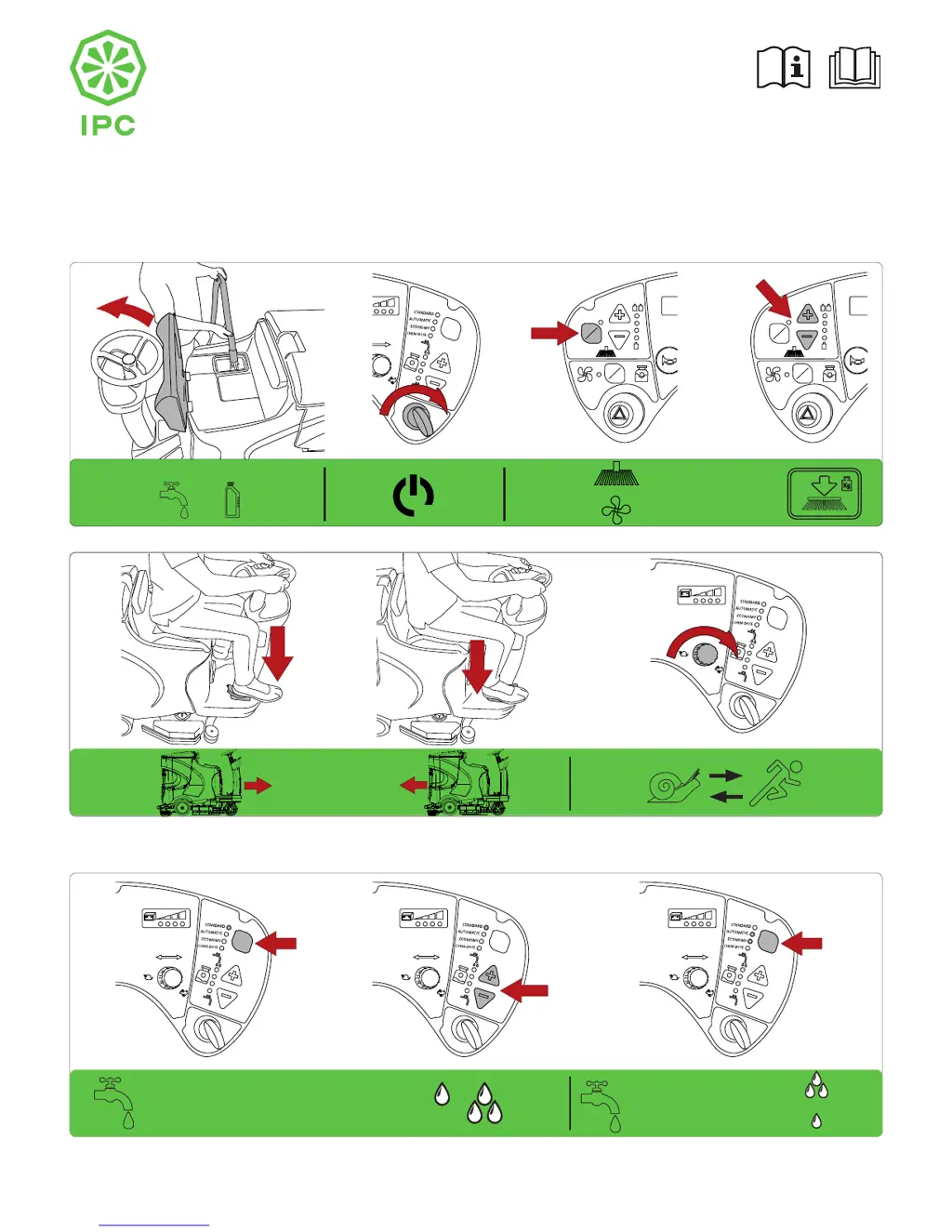
CT110 Quick guide
This guide is intended for quick consultation only and does not replace the user and maintenance manual.
Before using the machine, read the user and maintenance manual contained in the machine’s packaging thoroughly and strictly follow all the
instructions.
PREPARATION & OPERATION
1 2
6
54
PLDC01850
ON
CHEM
H2O
+
+
+
O
On
O
On
SELECT
O
On
O
On
SELECTSELECT
O
On
O
On
SELECTSELECT
O
On
O
On
SELECT
+
+
O
On
O
On
SELECT
3
O
On
O
On
SELECT
O
On
O
On
O
On
STANDARD
AUTOMATIC
ECONOMY

Other manuals for IPC CT110

Questions and Answers

  • H
    heathermayAug 16, 2025
    How to troubleshoot a suction motor that won't start on my IPC CT110?
    • P
      Paul KrauseAug 16, 2025
      If the suction motor on your IPC Floor Machine won't start, first, make sure the suction switch has been activated. Check that the motor power supply connector is correctly connected to the main wiring. If the fuse is blown, replace it. Also, ensure the collection tank is not full; empty it if necessary. If the motor is still not starting, it may be malfunctioning and require replacement.
  • R
    Reginald RobinsonAug 18, 2025
    What to do if the squeegee on my IPC CT110 Floor Machine doesn't clean properly?
    • B
      Barry DeanAug 19, 2025
      If your IPC Floor Machine's squeegee isn't cleaning effectively, several factors could be at play. The rubber blades might be worn and need replacement. There could be a blockage or damage in the squeegee or hose that needs clearing or repair. The float switch might have tripped due to a full collection tank, or it could be blocked or faulty, requiring you to empty the tank or repair the float. A blocked suction hose could also be the culprit, so try unblocking it. Check that the hose is properly connected to the squeegee and is not damaged. Finally, ensure the suction motor is receiving power and that there isn't a motor malfunction; check the motor power supply connector and the fuse.
  • M
    Michael HubbardAug 22, 2025
    How to fix the brushes not turning on my IPC CT110?
    • Z
      zdennisAug 22, 2025
      If the brushes on your IPC Floor Machine aren't turning, first ensure you've pressed the brush button. Check if the collection tank is full and empty it if necessary. Inspect the brush motor fuse; if it's blown, identify and resolve the cause before replacing it. If the batteries are flat, recharge them. Finally, if none of these steps work, there may be a motor malfunction requiring replacement.
  • G
    glen55Aug 25, 2025
    What to do if my IPC CT110 does not move?
    • P
      pparkerAug 26, 2025
      If your IPC Floor Machine isn't moving, the batteries may be flat, requiring a recharge. Alternatively, there could be a problem with the motor drive; check the alarm code. Also, make sure the emergency button is not pressed; if it is, press it to release.
  • A
    Angela ConnerAug 27, 2025
    What to do if my IPC Floor Machine is not dispensing solution?
    • L
      Lisa DixonAug 28, 2025
      If your IPC Floor Machine isn't delivering any solution, check that the tap upstream of the filter is open. Ensure the solution tank is filled. Also, inspect the hose delivering the solution to the brush for any blockages and remove them.
  • D
    Diane ShannonAug 30, 2025
    Why my IPC CT110 Floor Machine does not brake?
    • J
      Justin WhiteAug 31, 2025
      If your IPC Floor Machine isn't braking, check if the electromagnetic brake lock handwheel/screws are unscrewed and screw them up. If the issue persists, the electromagnetic brake may be malfunctioning and require replacement.
  • J
    julie58Sep 3, 2025
    What causes continuous solution flow in my IPC CT110 Floor Machine?
    • K
      Kerry HendersonSep 3, 2025
      If the solution flow on your IPC Floor Machine doesn't stop, the solenoid valve might be dirty, faulty, or have wiring issues. Check the solenoid valve and its wiring. If necessary, replace the solenoid valve.
  • M
    Michael RichardsSep 6, 2025
    Why is the solution flow interrupted during operation of my IPC CT110?
    • S
      Stacy ChavezSep 6, 2025
      If the solution flow on your IPC Floor Machine is interrupted during operation, it may be due to a dirty or faulty solenoid valve, or issues with the solenoid valve wiring. Inspect the solenoid valve and its wiring, and replace the valve if necessary.
  • L
    ljacobsSep 9, 2025
    Why is my IPC Floor Machine not cleaning evenly?
    • R
      richard65Sep 9, 2025
      If your IPC Floor Machine isn't cleaning evenly, the brushes or abrasive disks may be worn and need replacement.
  • C
    connorlloydSep 12, 2025
    What causes rapid battery drain in my IPC Floor Machine after proper charging?
    • E
      Elizabeth SinghSep 12, 2025
      If the battery runs down too rapidly during use, even though it has been charged with the correct procedure and at the end of charging it is evenly charged when tested by a hydrometer, it may be because the battery is new and needs to be run in by performing 20-30 complete charging and running down cycles to obtain the maximum performance. The machine may also be used for the maximum of its power for continuous periods and the run time is insufficient, when permitted and possible, use batteries with a higher capacity or replace the batteries with others already charged. It could also be that the electrolyte has evaporated and does not completely cover the plates, add distilled water, topping up each element until it covers the plates then recharge the battery.

Summary

Preparation and Operation Guide

Machine Setup and Operational Steps

Covers adding water/chemicals, powering on, mode selection, and machine operation.

Daily Maintenance Procedures

Routine Cleaning and Inspection

Includes cleaning water tank, checking suction filter, detergent filter, brushes, and squeegee.

Squeegee Blade Replacement

Detailed steps for removing, reversing, and replacing squeegee blades.

Brush Attachment and Removal

Instructions for attaching and removing the machine's brushes.

IPC CT110 Specifications

General IconGeneral
BrandIPC
ModelCT110
CategoryFloor Machine
LanguageEnglish

Related product manuals