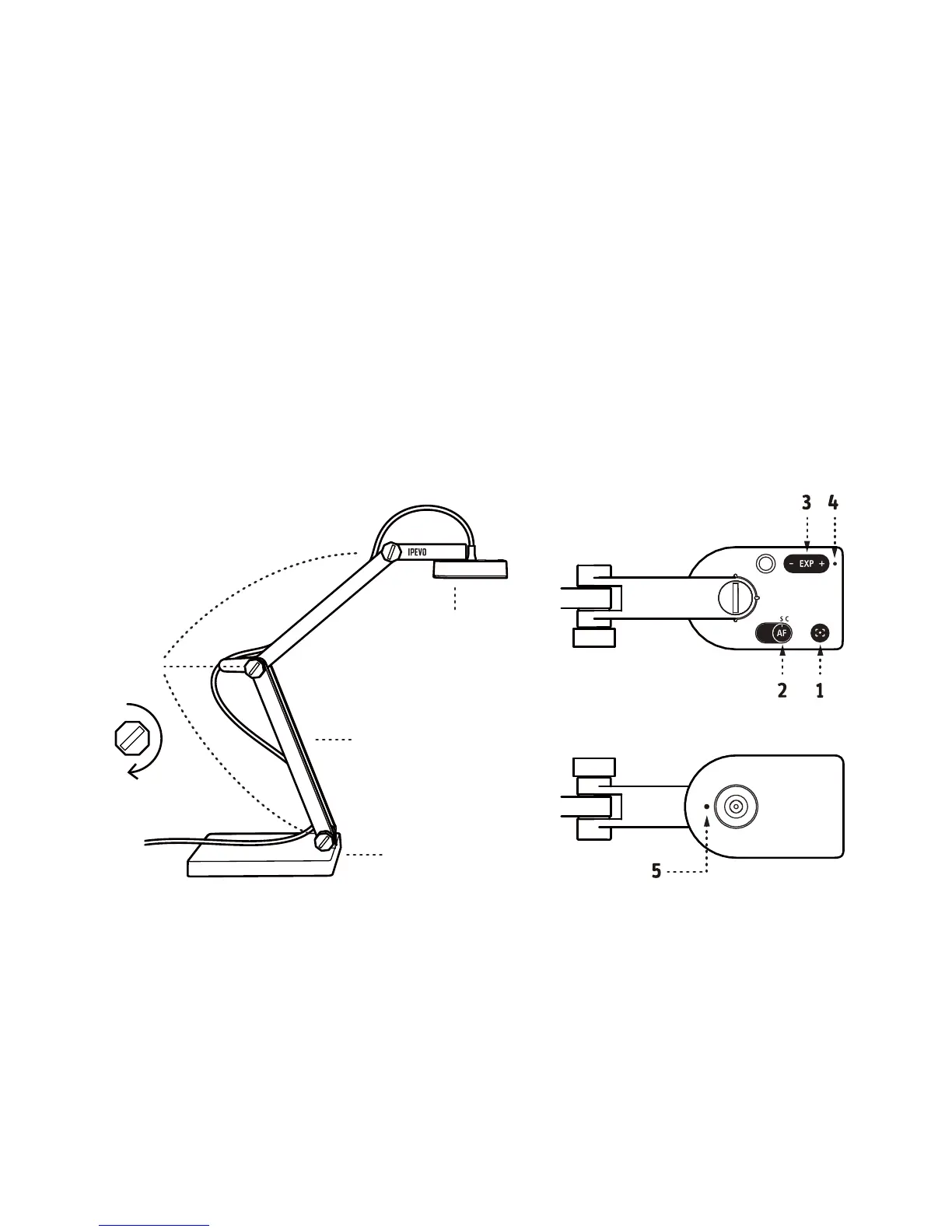
Getting to Know Your V4K
Copyright© 2018 IPEVO Corp. All rights reserved
1. Focus button: Focuses the subject.
2. AutoFocus switch: Sets the focus to Single (S) for static subject, or
Continuous (C) for moving subject.
3. Exposure toggle: Provides exposure customization.
4. LED indicator: Turns white if V4K is in use and providing an image.
5. Microphone: Turns on when V4K is in use. You can select it as your audio
device for video recording.
• Camera: 8 Megapixel camera. Camera head can be swiveled for customizing
orientation.
• Multi-jointed stand:
- Quickly and easily change the height and position to capture your material.
- Tighten loose joints by turning bolts at connecting joints clockwise with
a coin.
• Weighted base: Provides a stable base for V4K.
V4K consists of three parts — an 8 Megapixel camera, a versatile multi-jointed
stand, and a weighted base.
Camera
Multi-jointed stand
Bolts
Weighted base
Tighten



 To Previous Page