1
2
3
4
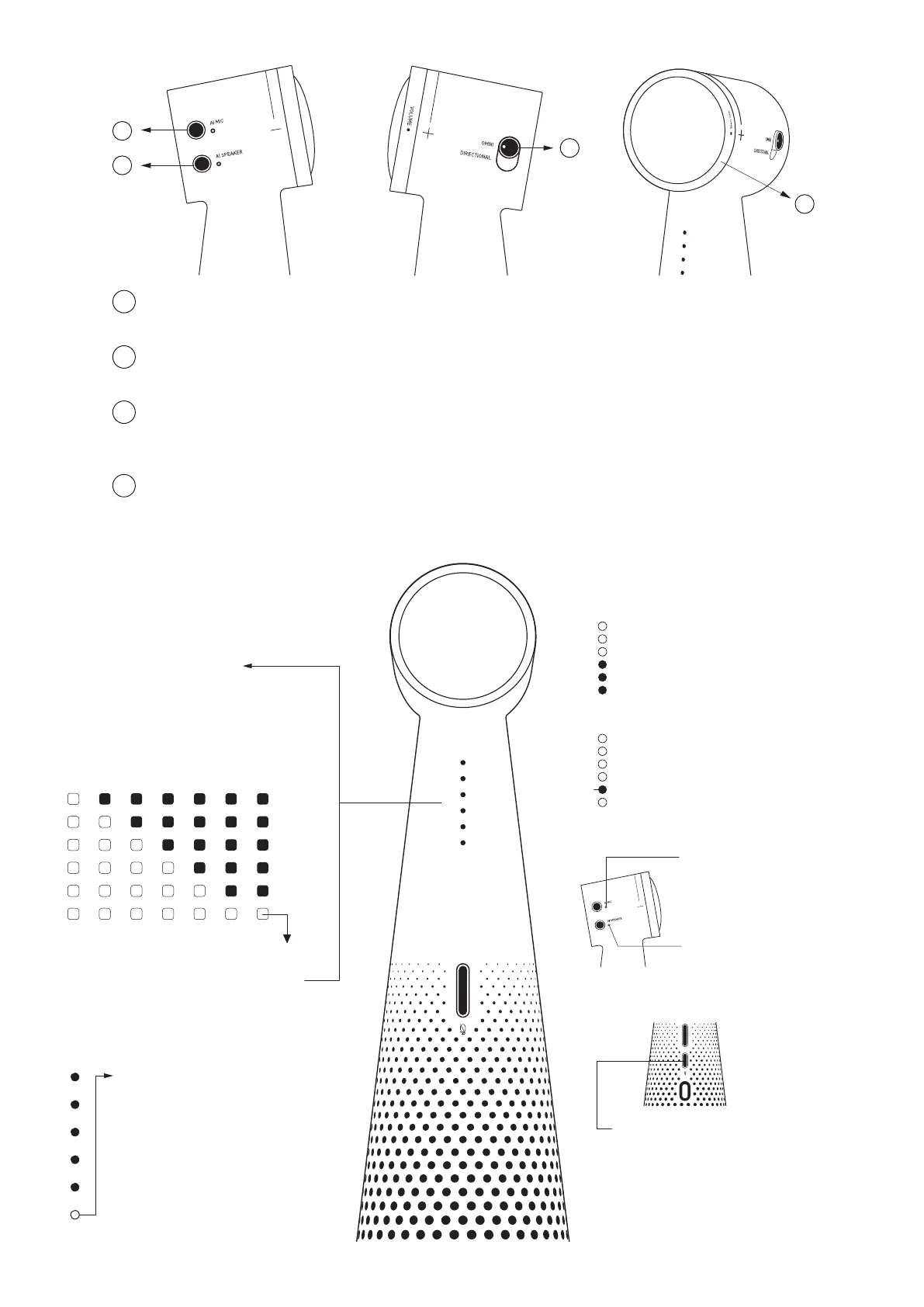
AI Voice for Mic
1
Turns noise reduction on/off for the microphone.
2
AI Voice for Speaker
Turns noise reduction on/off for incoming calls.
3
Microphone mode switch
Switches between the directional and omnidirectional microphone modes.
When in the directional mode, only the front microphone is capturing sound in a 120° range.
4
Volume knob
Turn clockwise to increase the volume of the speaker.
LED Signals
Battery status
Press power button once to
display the battery life.
85-100%
70-85%
55-70%
40-55%
25-40%
15-25%
< 15%
Blinking
Charging status
(The 1st LED shines yellow)
.Blinking = Charging
.Blinking fast = Battery
below 15%
.LED on = Fully charged
Other LED signals
Microphone Volume
The volume level is displayed
on the front LED bar.
VOL
Microphone Mute Indicator
LED
The 2nd LED shines red when the
Shines
microphone is muted.
Red
AI MIC
LED Indicator
Shining = AI noise reduction on
AI SPEAKER
LED Indicator
Shining = AI noise reduction on
Bluetooth LED Indicator
Blinking blue = VOCAL is pairing.
Shining blue = VOCAL is paired.
LED off =VOCAL isn't paired with any device.


 To Next Page