Need help?
Do you have a question about the IPRO RH219s and is the answer not in the manual?
Lists Bluetooth version and noise reduction technology used.
Details the supported Bluetooth profiles like HSF, HFP, A2DP, AVRCP.
Specifies the maximum wireless operating range in meters.
Indicates the time required to fully charge the headset.
Specifies the continuous usage time for calls.
Specifies the continuous usage time for playing music.
Indicates the duration the headset can remain powered on without active use.
Identifies the type of battery used in the headset.
States the energy storage capacity of the battery.
Provides the physical measurements of the headset.
Lists the weight of the headset.
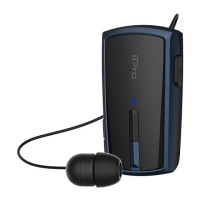
Locates and identifies the primary multi-function control button.
Identifies the port used for charging the device.
Locates and identifies the button used for rewinding the earphone cord.
Points out the buttons for adjusting audio volume up and down.
Highlights the status indicator light on the headset.
Identifies the location of the built-in microphone.
Shows the detachable earphone for audio output.
Identifies the clip for attaching the headset to clothing.
Points out the openings for attaching a neck strap.
Explains how to extend and retract the earphone cord using the rewind button.
Describes LED patterns for different device statuses like pairing and connected.
Details the vibration signals for events like power on/off and calls.
Lists the audio prompts indicating device status and caller information.
Instructions for charging the device using the provided USB cable and charger.
Steps to turn the headset on and off, including indicator feedback.
Step-by-step guide to connect the headset to a Bluetooth-enabled device.
Guide to pair and connect the headset with two Bluetooth devices simultaneously.
Explains how the headset automatically reconnects when turned on.
How to answer, end, or reject calls using the multi-function button.
Functions for auto-redialing the last number and activating voice dialing.
How to re-connect lost Bluetooth and activate pairing mode.
Procedure to change the voice prompt language.
Notifies user with vibrations when the headset is out of range.
Enables voice commands for phone operations.
Provides audible feedback for device status and calls.
Turns off the headset automatically when idle to conserve battery.
Automatically redials the last dialed number.
Allows for stereo sound experience with an additional earphone.
Shows headset battery status on the connected mobile device screen.
Solutions for when the headset fails to pair with a device.
Steps to resolve problems with no sound from the earphone.
Troubleshooting tips for when auto-pairing does not work.
Warning about potential risks associated with the rewind button.
Recommendations for using the headset safely during driving.
Advisories regarding keeping the product away from children.
Guidance on areas where electronic devices are prohibited.
Instructions for the proper disposal of the device's battery.
Proper handling advice for the retractable earphone cord.
Tips for storing the headset and preventing accidental calls.
Guidance on avoiding extreme conditions and proper cleaning.
Warnings against attempting internal repairs or battery replacement.

 To Next Page
 General