Need help?
Do you have a question about the IPRO RH120 and is the answer not in the manual?
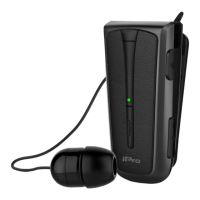
Describes the earphone component of the headset.
Details the LED indicator for status feedback.
Explains the multi-function button's operation.
Indicates the volume up and down controls.
Identifies the rewind button for earphone retraction.
Points out the holes for attaching a neck strap.
Highlights the clip for attaching the headset.
Locates the microphone for calls.
Shows the port for charging the headset.
Describes how to attach the headset to a lapel using the clip.
Explains how to wear the headset around the neck using the neck strap.
Explains indicators and prompts for power on/off.
Covers status indicators and voice prompts for pairing and connection.
Details indicator and voice prompt for incoming calls.
Shows indicators for charging, full charge, and low battery.
Instructions on how to charge the headset using a Micro USB cable.
Procedure for turning the headset on and off using the multi-function button.
Step-by-step guide for pairing the headset with a Bluetooth device.
Connects the headset to two Bluetooth devices simultaneously.
Explains the automatic connection feature when the headset is turned on.
Details all functions controlled by the multi-function button.
Explains Voice Dial, Voice Prompt, and Battery Save functions.
Solutions for common headset pairing problems.
Steps to resolve no audio issues from the earphone.
Troubleshooting steps for automatic pairing failures.
Covers warnings on driving, children, usage areas, and battery disposal.
Instructions for proper care, cleaning, and storage of the headset.

 To Next Page
 General