20
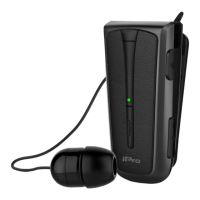
Multi-function Button
The uses of the multi-function button include:
1. Answer or end a call (press the button once)
2. Reject a call (press the button for 2’’)
3. Activate Voice Dial (press the button for 2’’)
Note: Your mobile should support Voice Dial.
4. Re-connect lost Bluetooth connection (press the button once)
5. Activate pairing mode (press and hold until blue and red-light flashing)
6. Change Voice Prompt language from Greek to English (as soon as paring mode is
activated press the button twice)
Special Features – Functions
1. Voice Dial Function
Voice Dial function can be used from the headset by pressing the multifunction
button for 2’’
2. Voice Prompt Function
The headset supports Voice Prompts that will inform you about the current status of
the headset.
Note: Voice Prompts are available in Greek and English language.
3. Save Battery
If the headset stays idle for 5 minutes without connecting to a device, it will
automatically turn off to save energy. The same will be happened if you turn off the
Bluetooth function of your device


 To Next Page