- 7 -
1. Remove the sensor cap to expose the sensor probe.
2. For adults, pull the ear backward and upward with your free hand to straighten
the ear canal (image 1).
3. Gently insert the sensor into the ear canal.
4. Ensure that the sensor is aimed directly toward the eardrum (image 2).
5. If the ear canal is not straightened, inaccurate readings may result (image 3).
6. For children between 6 and 12 months old, pull the outer ear straightbackward
(image 4).
7. Press the button once to take the measurement.
8. A beep indicates that the measurement has been taken and the thermometer
may be removed from the ear.
9. Look at the display to read the temperature.
10. Clean the sensor and cover it again with the sensor cap.
4.3 How to Correctly Perform a Head Measurement
NOTE: The forehead measurement is an indicative reading. The measured forehead
temperature can uctuate up to 1.0 ˚F/ 0,5˚C from your actual body temperature.
Please be aware of the factors that inuence the accuracy as described in the section
‘Precautions for Accurate Measurements’.
Always check if the lens is clean.
Always make sure the user and the thermometer will have been in the same
room for at least 30 minutes prior to the measurement.
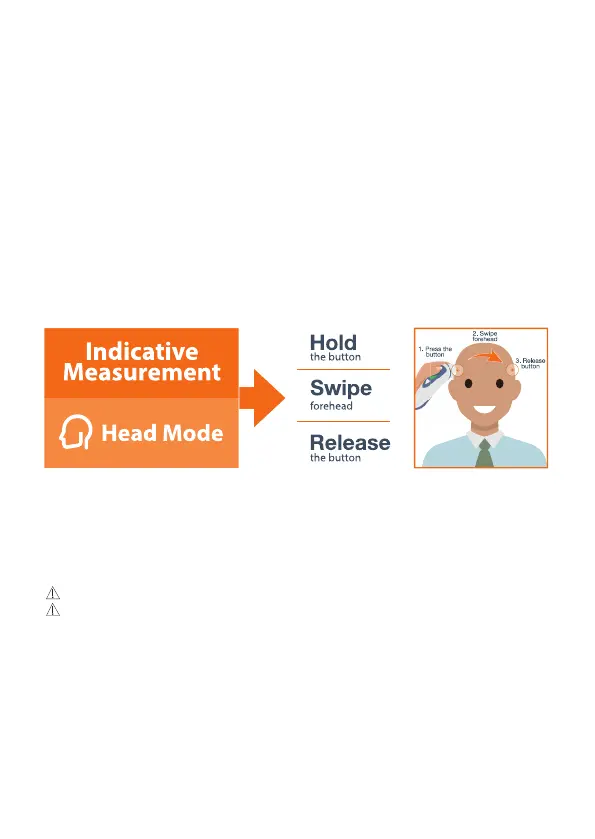
To perform a head measurement:
1. Keep or put the sensor cap in place;
2. Aim the sensor at the temple and start holding the button;
3. Move the sensor across the forehead to the other temple.
4. Release the button as soon as the sensor is at the other temple.
Tip: Touch the skin lightly but do not press the sensor too hard to the skin as this
may give inaccurate measurement results. Visit www.iproven.com/489 to watch the
instruction video.
PLEASE READ BEFORE YOU START:


 To Next Page