21
6
1
1
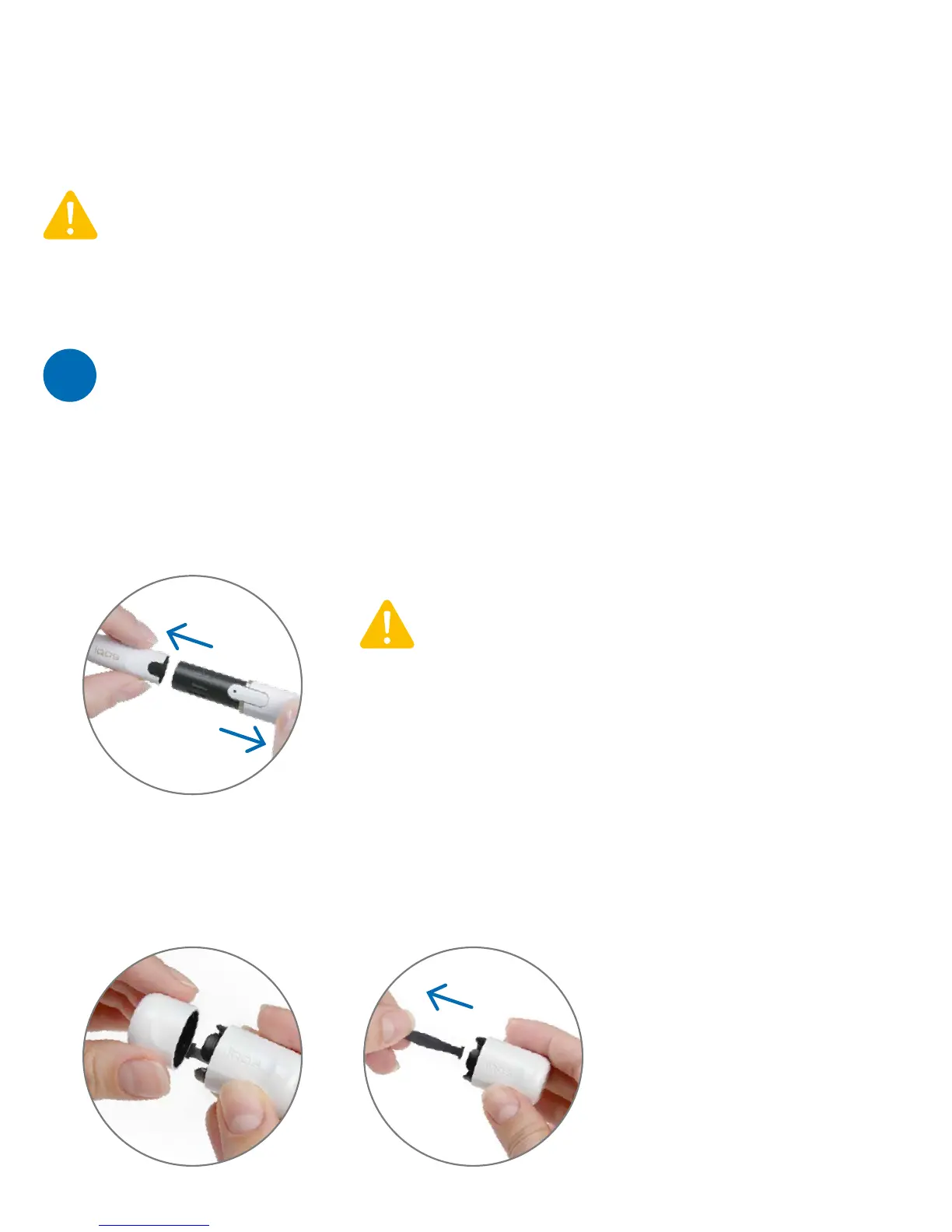
To open the IQOS™ Cleaner, unclip the Cap Brush from the Heater Brush (1)
and remove the Pin (2):
Make sure the IQOS™ Holder is switched OFF
before cleaning it. Avoid contact of any IQOS™
cleaning accessories (IQOS™ Cleaner,
IQOS™ Cleaning Sticks) with any source
of ignition, eyes and skin.
Always remove the Cap before cleaning as shown below:
For optimal performance and a consistent taste,
we recommend that you clean the IQOS™ Holder
after every 20 tobacco sticks.
HOLDER MAINTENANCE
You can switch OFF your IQOS™ Holder experience at any moment, to do so press
and hold the IQOS™ Holder button for 3 seconds, it will then switch OFF.
You can’t resume it and you must dispose of the tobacco stick with normal waste.
Then load back your IQOS™ Holder in the IQOS™ Pocket Charger to be recharged.
Please note that the removal of the tobacco stick will not end the heating process
of your IQOS™ Holder.
PREPARE



 To Next Page