Introduction
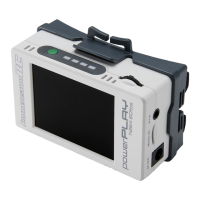
The ImmersionRC PowerPlay is a high quality stand-alone 60fps DVR, with integrated goggle battery.
Designed for either head mounting (with included straps and hardware), or simply slipped into a
pocket, the PowerPlay can either be used as a simple DVR recorder, or used to also power a set of
FatShark goggles.
The Power Part...
PowerPlay’s Power section is a pair of two 18500, Li-ion cells, that can power a Dominator HDO +
rapidFIRE + DVR for up to 3 hours *.
To recharge, either use the built-in USB-C port for up to 1.5A charging, or simply pop out the cells,
and replace with a freshly charged set.
The PowerPlay ships with 1400mAh cells, but larger capacity 2040mAh cells are available from most
vape shops, and are the same ones used in the FrSky X-Lite radios, so any decent FPV retailer will
stock them.
* 3 hours with 2040mAh cells, not shipped with the product
NOTE: The larger 2040mAh cells are highly recommended for reasonable battery life.
Charging
The PowerPlay, even though sporting a USB-C connector, does not support USB-PD charging, and
therefore is limited to about 0.8A charge current, available from most standard USB ports.
Charging overnight will safely charge to full capacity, but for rapid charging it is highly recommended
to remove the cells, and charge in an external charger.
Please follow the cell manufacturer’s recommendations for charge current. 1C recommended for the
stock cells (1.4A).
USB-C Video Download
The stock firmware does not support downloading of files from the SD-Card over the USB port.
The ‘v2’ firmware image may be downloaded from our website here:
https://www.immersionrc.com/fpv-products/powerplay/


 To Next Page
 Loading...