0807
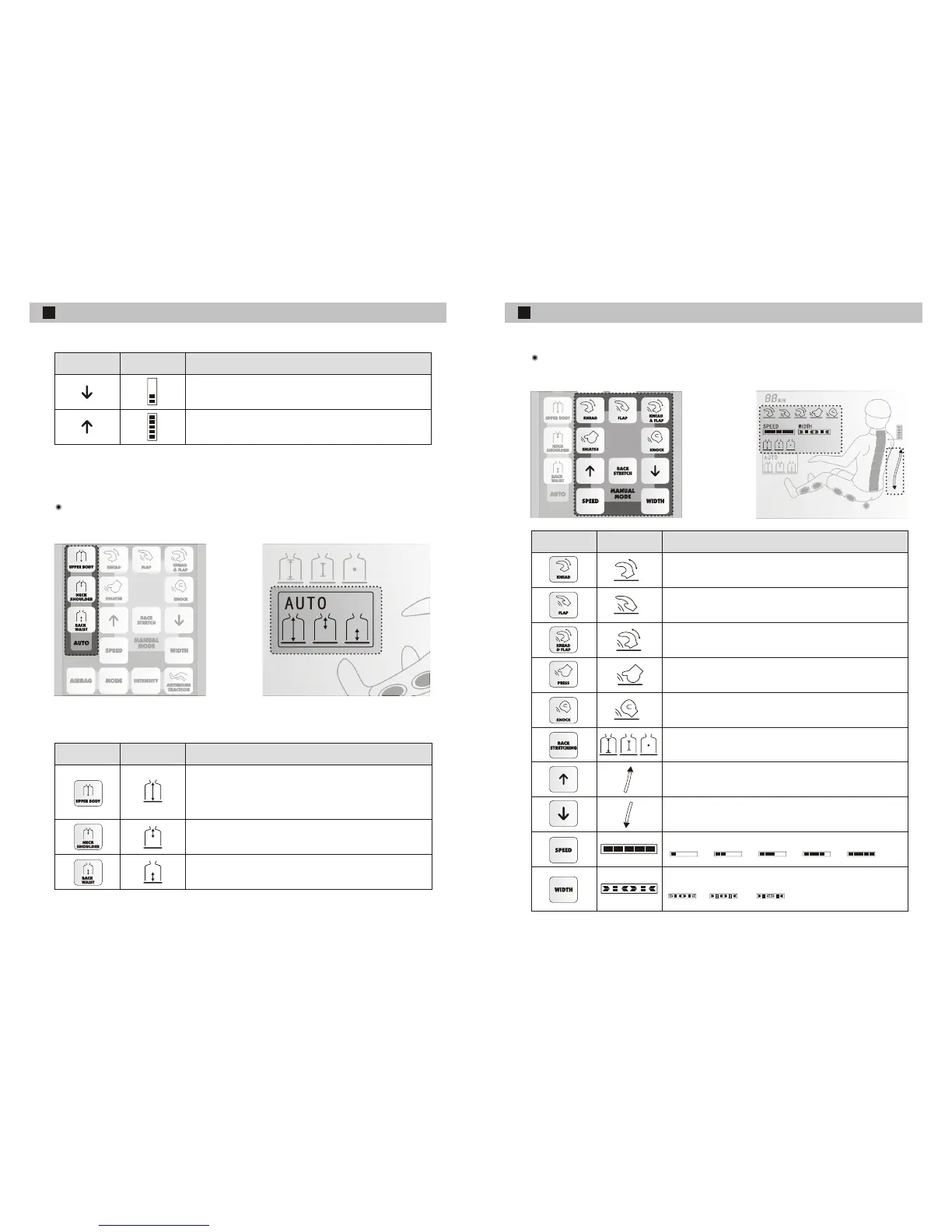
Button show
description
Regulate their shoulder positions according to people's size
Regulate their shoulder positions according to people's size
Button show
description
Adopt the various tactics to carry on automatic massage to
different position of the upper part of the body, the massage
position covers the whole upper part of the body.
To carrying on automatic massage around the
neck shoulder mainly
Carry on automatic massage around in carrying
the waist mainly.
Pushing the switch in the automatic mode will start the automatic mode
Auto mode
BUTTON EXPLANATION
1 2 3 4 5
Manual mode
BUTTON EXPLANATION
Button show
description
Width
Middle
Narrow
Press the manual mode button and it will automatically change to manual mode.
Knead, loosen your tense muscles
Flap, penetrates deep into the body
Knead & Flap, Relaxing the muscles
Shiatsu Technique
To relieve tired, soothing, sore and stiff muscles
Tapping, to increase blood circulation and skin elasticity
To select full-range, partial or fixed massage
This button to move the device upward to suit precise
massage points, invalid under auto mode.
massage
This button to move the massage device downward to suit
precise massage points, invalid under auto mode.
The massage tactics tempo can be chosen by 5 speed
Massage treatment of flapping, shiatsu, or knocking has been chosen,
press this button to adjust the width of the massage hands, three options


 To Next Page