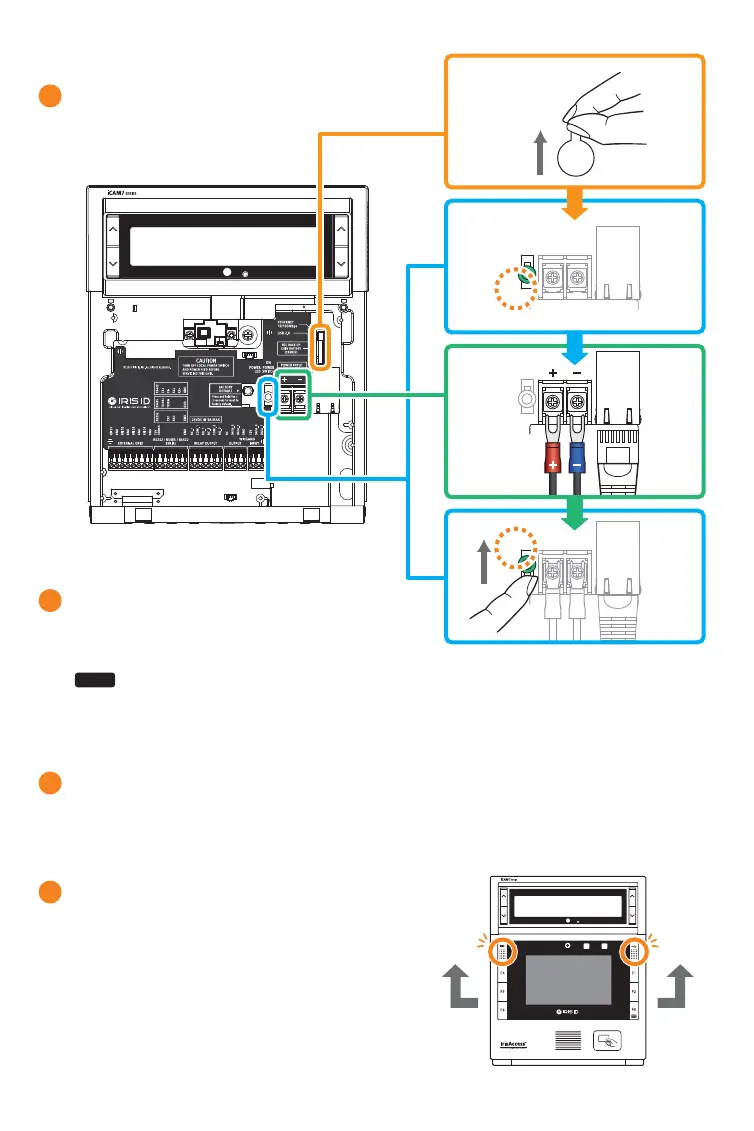
Turn on power source and switch the power switch of the iCAM7 series
unit to the ON position.
8
After wiring the unit and switching
it to the ON position, close the interface panel
and fasten the screws.
(with screw caps placed back into closed position).
9
Remove protective film from RTC battery.
6
Before wiring unit, confirm the power
is in the off position. Route and connect
the Power and Ethernet wires to
iCAM7 series.
7
NOTE
OFF ON
Power on
Power Supply
Connector
Ethernet
Cable
If connecting any other wiring such as Wiegand, GPI/O to the iCAM, review the following
section “Wire Connection Details” before closing interface panel and fastening screws.
7
OFF ONOFF ON


 To Next Page