13
How to Operate
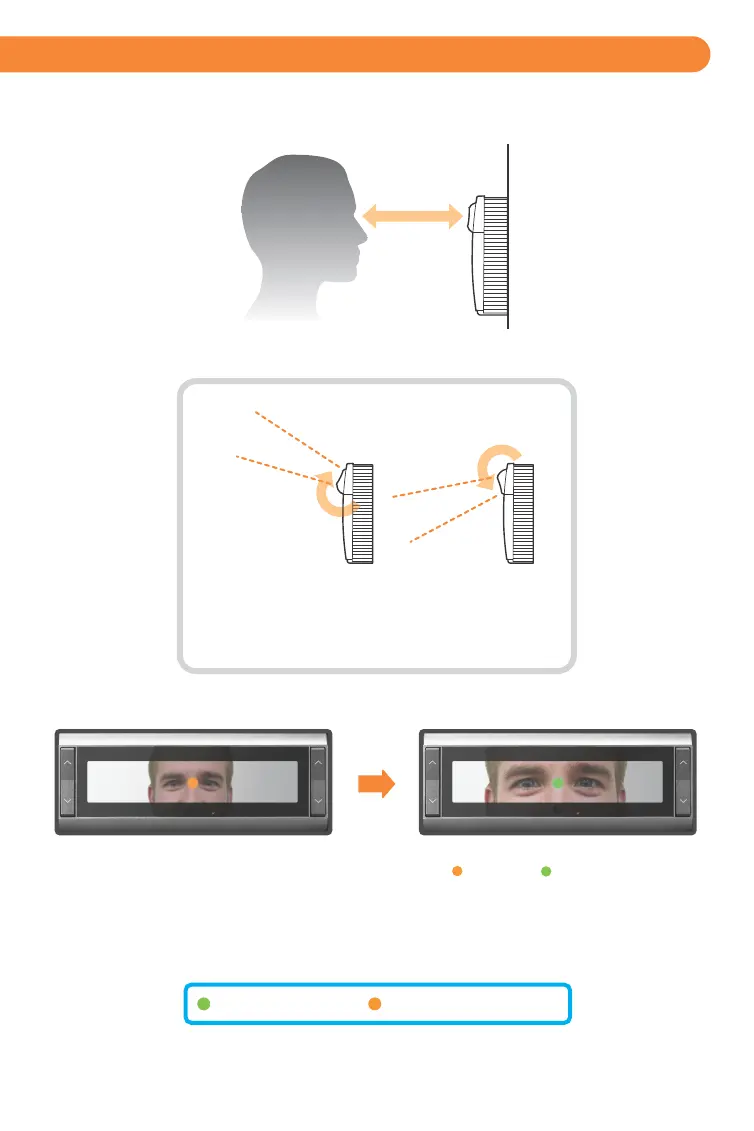
• Orange turns to green when user is at correct distance.
• Visual indication is amplified with friendly audio prompts.
• Right and left irides are acquired.
• A face picture can also be captured.
• iCAM activates when user approaches or when card is presented.
• Picture capture range is 11~15 inches (28-38cm) away.
• Self or auto/set height adjustment.
• Placing dot over the bridge of nose, easily helps alignment.
Green dot = In range
Orange dot = Out of range
(28-38cm)
Tilt up +35 Degrees
Read distance 14inches
Tilt down -25 Degrees
Read distance 14inches away
11~15”
The on-unit up/down tilt buttons can be used to adjust
the tilt angle; or an external mounted switch can be
wired to control up/down tilt via GPI.


 To Next Page