10
■
Drain waste water from the
collecting tank
!
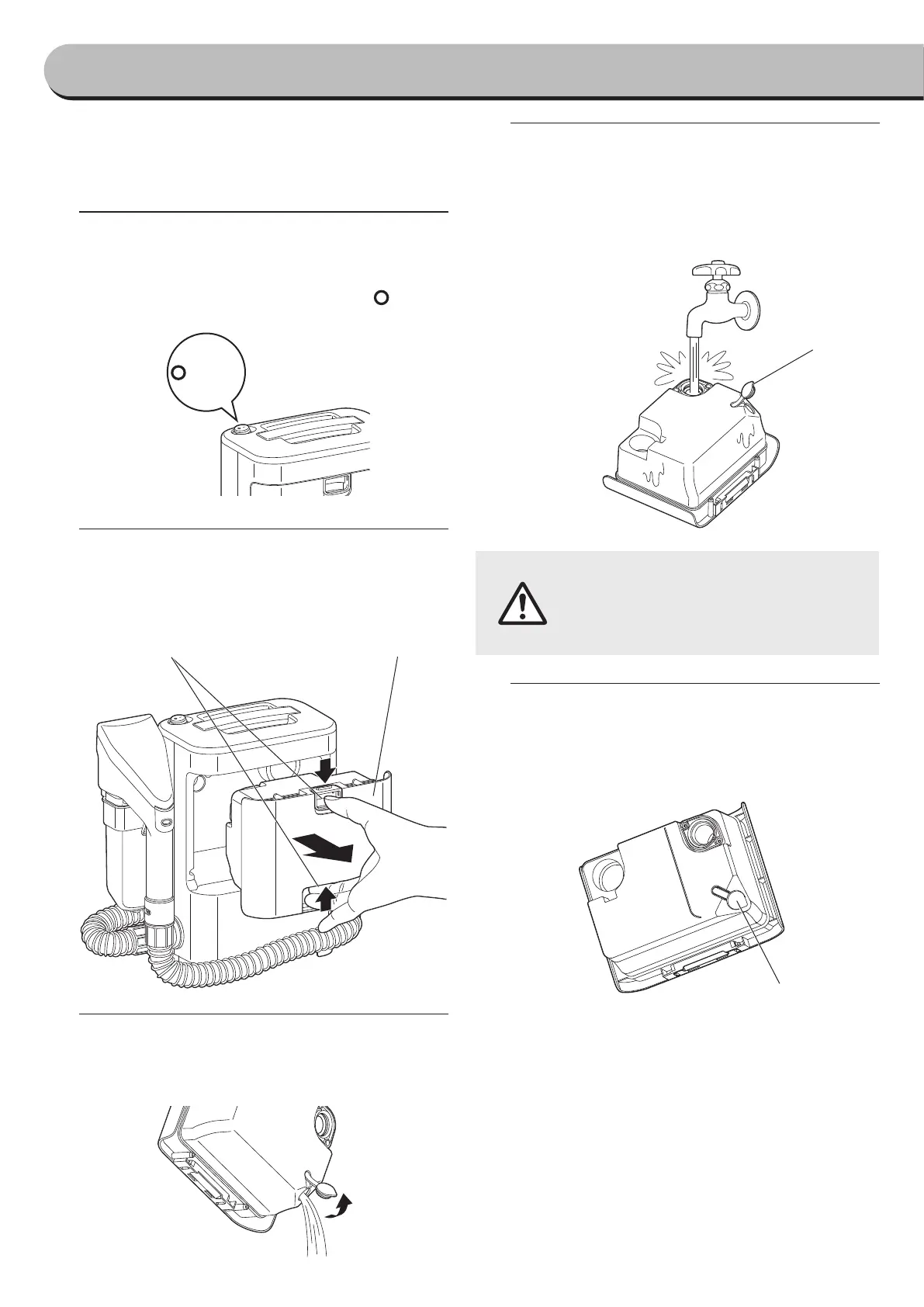
Turn o the power switch
• When waste water in the collecting tank reaches
the full water mark, stop the machine and turn o
power by moving the power switch to “ (OFF)”.
(OFF)
#
Remove the collecting tank
• Remove the tank by pulling it towards yourself
after releasing the two latches from upside and
downside which secure the collecting tank.
$
Remove the drain cap at the back side of
the collecting tank to drain waste water
from collecting tank
%
Rinse the collecting tank after finishing
the operation
• Rinse the tank with tap water by pouring water
from the inlet at the back side of the collecting
tank after nishing the operation.
●
If sludge remains in the collecting
tank or inside the vacuum hose,
microorganisms or germs may
breed or develop which could cause
a bad smell.
&
Close the drain cap as before and attach
the collecting tank to the body
• Close the drain cap by inserting until the end.
Failure could cause a water leak.
How to use
continued
Latch
Collecting tank
Drain cap
Drain cap


 To Next Page