EasyManua.ls Logo

IRiver E10 - Page 6

IRiver E10
38 pages
Print Icon
To Next Page IconTo Next Page
To Previous Page IconTo Previous Page
Loading...
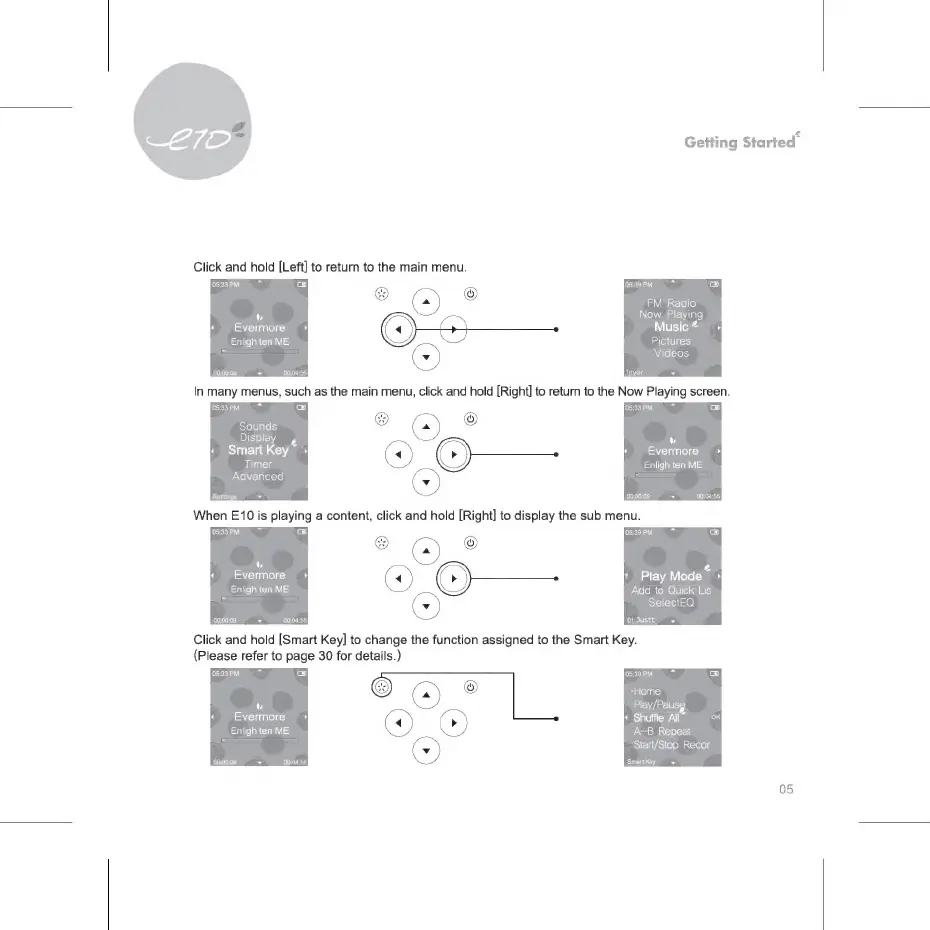
Click
and
hold
[Left]
to
return
to
the
main
menu.
L2
BEES
Enligh
ten
ME
00:00:09
>
00:04:55
05:33
РМ
Sounds
Display
,
Smart
Key
~
Timer
Advanced
Settings
-
Getting
Sta
rted*
05:39
РМ
FM
Radio
Now
Playing
Music
^
Pictures
Videos
L7
Evermore
Enligh
ten
ME
When
E10
is
playing
a
content,
click
and
hold
[Right]
to
display
the
sub
menu.
05:33
PM.
св
(7
Evermore
+
Enligh
ten
ME
*
Play
Моде“
Add
to
Quick
Lis
SelectEQ
СЕЗ
а
Click
and
hold
[Smart
Key]
to
change
the
function
assigned
to
the
Smart
Key.
(Please
refer
to
page
30
for
details.)
LZ
Evermore
Enligh
ten
ME
00:00:09
>
00:04:55
05:39
PM.
"Ноте
Play/Pausg
*
Shuffle
All”
А-В
Repeat
Start/Stop
Recor
SmartKey
05

Related product manuals