Need help?
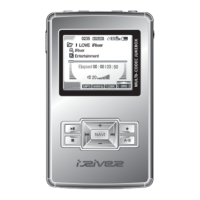
Do you have a question about the IRiver H120 and is the answer not in the manual?
Details player charging time and battery life.
Instructions for navigating menus and tracks using device buttons.
Steps to access and navigate the device's menu system.
How to adjust the player's volume using the jog lever.
How to switch between HDD and FM modes.
Steps to navigate through tracks and folders.
How to enter and operate the main menu system.
How to activate playback modes like Repeat and Shuffle.
How to play a selected interval repeatedly during playback.
How to search for audio tracks using the file tree method.
How to search for music using ID3 tag information like Artist or Genre.
Steps to update the song database for accurate navigation.
How to add new songs to the database without updating the entire file.
Guide to creating a TEXT folder and copying .TXT files for reading.
Instructions for navigating and displaying text files on the player.
How to move through text files line by line or page by page.
How to jump to a specific position within a text file by digit.
How to change FM frequency and use auto scan.
Steps to manually save desired FM radio stations.
How to automatically scan and save FM stations.
Options for Record Type, Bit Rate, AGC, and Voice Monitor.
 General
| Brand | IRiver |
|---|---|
| Model | H120 |
| Category | MP3 Player |
| Language | English |


 To Next Page