OPERATING THE REMOTE CONTROL
HOLD
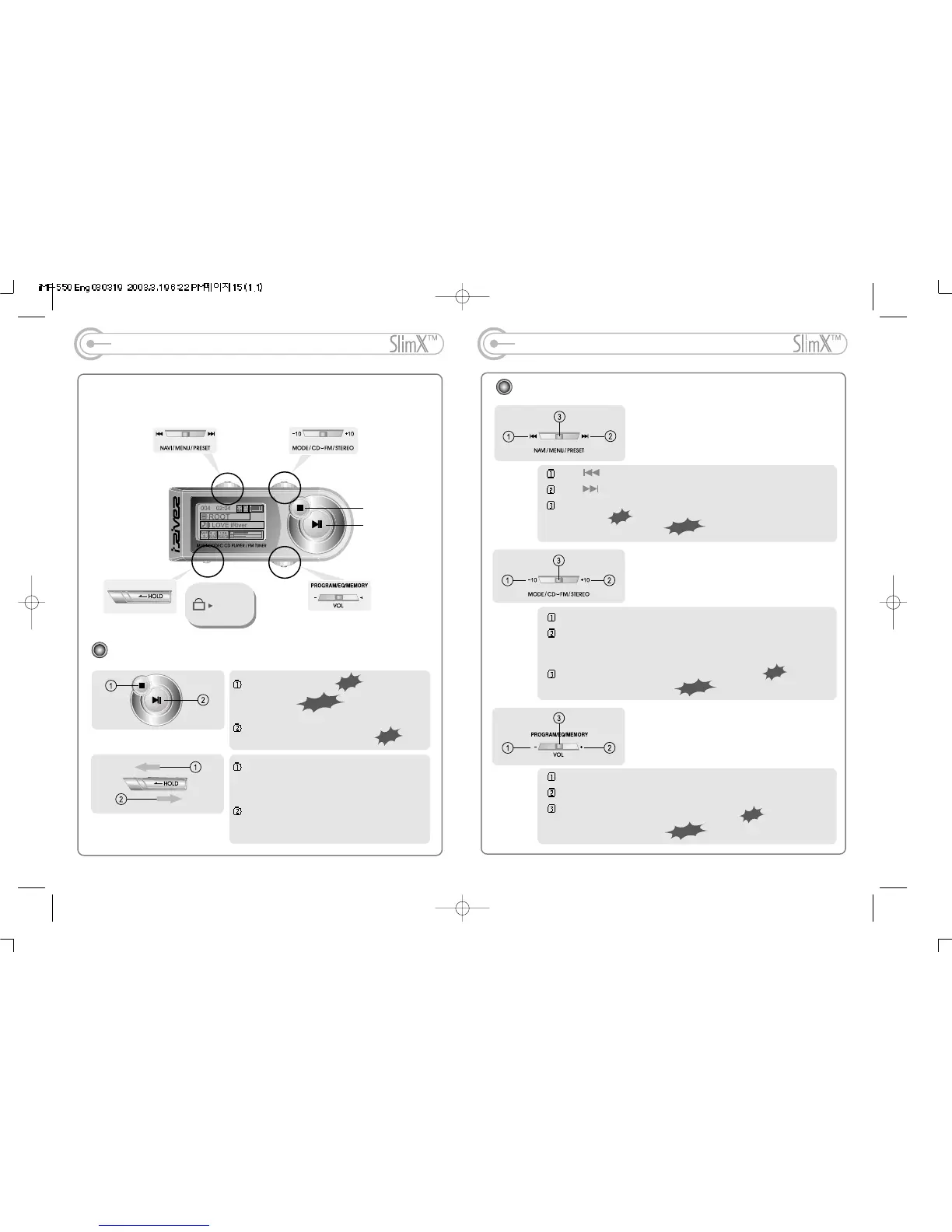
The remote control operates every function using 3 jog switches and 3 buttons.
Basic Operation Function
OPERATING THE REMOTE CONTROL
Basic Operation Function
-12- -13-
PLAY/PAUSE/MUTE
STOP
Push to select the previous track, broadcasting or frequency
Push to select the next track, broadcasting or frequency
To activate Navigation function to set or release the preset
function(FM).
To activate Menu function
Push-10buttontogobacktotheprevious10thtrack.
Push+10buttontogobacktothenext10thtrack.
Push and hold +10 button to activate/release the iRiver Shock
Free or Etiquette function.
To set the CD playback mode or FM Stereo mode.
To select CD or FM function.
Push VOL - to decrease volume
Push VOL + to increase volume
Ω
To set CD Program/ Interval repeat playback
To save/ delete FM channels.
To playing CD/ select EQ
To stop CD playback
To power on
To power on, play CD or pause
Set the HOLD switch on the remote control
to ON to not operate the buttons on the
remote control.
Set the HOLD switch on the remote control
to OFF to operate the buttons on the
remote control.



 To Next Page